Guides

Configuration Files for Project Zomboid server
Running a Project Zomboid server puts a handful of configuration files in your hands, covering everything from core server rules to the sandbox settings that shape your world. Reaching them takes a few clicks in the File Browser, and knowing which file holds which setting saves you from hunting through four windows for one value.
In this Nitrado guide, we’ll show you how to locate your Project Zomboid configuration files and what each one controls. We’ll also cover a start-time value that’s easy to misread.
Locate Your Project Zomboid Configuration Files
Open your Nitrado Web Interface and go to the File Browser. From there, follow this path to reach your configuration files:
zomboid > profile > Zomboid > Server
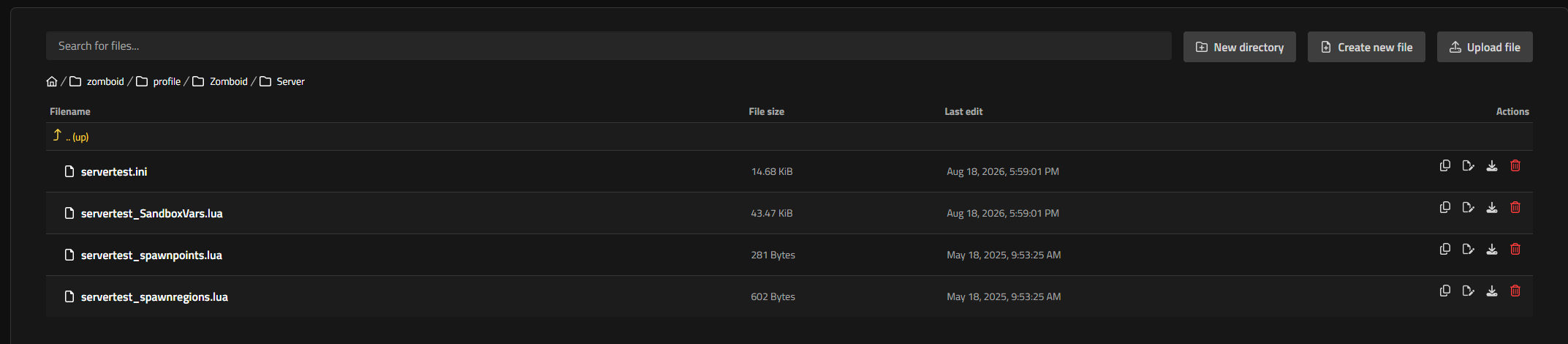
That folder holds four files: servertest.ini, servertest_SandboxVars.lua, servertest_spawnpoints.lua, and servertest_spawnregions.lua. Each one controls a different part of your server, and the sections below cover what each file does.
⚠️ Before editing any of these files, we recommend making a backup of your world.
The servertest.ini File: Core Server Settings
This file controls your server’s core behavior: connection rules, chat, whitelisting, and a handful of gameplay toggles that apply no matter which sandbox preset you choose. Here are the settings worth knowing:
PVP: Turns player-versus-player combat on or off.PVP=trueenables it,PVP=falsedisables it.PauseEmpty: Stops game time when no players are online. SetPauseEmpty=trueto enable it, orPauseEmpty=falseto keep the in-game clock running with no one connected.GlobalChat: Enables the/allchat command, letting players message everyone on the server regardless of distance. SetGlobalChat=trueto enable it, orGlobalChat=falseto turn it off.Open: Controls whitelisting.Open=truelets anyone join;Open=falserestricts joining to players already added to the whitelist.ServerWelcomeMessage: Sets the message players see when they log in. It supports the<LINE>tag for line breaks and<RGB:r,g,b>codes for text color.SpawnPoint: Forces every new player to spawn at fixed X, Y, and Z world coordinates, written asSpawnPoint=x,y,z. The default0,0,0disables it, so players spawn normally through the spawn regions. Use the Project Zomboid Map Project to find coordinates for a specific spot.DoLuaChecksum: Kicks players whose game files don’t match the server’s. KeepDoLuaChecksum=trueso modified files can’t slip onto your server unnoticed.AnnounceDeath: Broadcasts a player’s death to the rest of the server. SetAnnounceDeath=trueto enable it, orAnnounceDeath=falseto turn it off.
The servertest_SandboxVars.lua File: World and Gameplay Settings
This file handles the world itself: zombie population, weather, loot rarity, and how time passes. You don’t need to touch it, but it’s worth reading if you want a server that plays differently from the default settings.
Zombies: Sets zombie population density, on a scale of1(Insane) to6(None), with2Very High,3High,4Normal, and5Low in between. The default isZombies=4for Normal population.Distribution: Sets where zombies spawn. The default isDistribution=1, which spawns them focused around urban areas;2spreads them uniformly across the map.StartMonth: Sets which calendar month the server starts in, from1(January) to12(December). The default isStartMonth=7for July.StartTime: Sets the hour the server starts at, on a scale of1to9.1is 7:00 AM,2is 9:00 AM,3is noon,4is 2:00 PM,5is 5:00 PM,6is 9:00 PM,7is midnight,8is 2:00 AM, and9is 5:00 AM. The default isStartTime=2for a 9:00 AM start, so pick the value that matches the start time you actually want.FoodLootNew: Multiplies how much perishable food spawns in containers, from0.0to4.0. The default isFoodLootNew=0.8; raise it above1.0for a better-stocked map. Canned and dried food uses its ownCannedFoodLootNewvalue.Temperature: Sets the overall climate, on a scale of1(Very Cold) to5(Very Hot), with2Cold and4Hot in between. The default isTemperature=3for Normal climate.Rain: Sets rainfall frequency, on a scale of1(Very Dry) to5(Very Rainy), with2Dry and4Rainy in between. The default isRain=3for Normal rainfall.MaxItemsForLootRespawn: Sets the item count that excludes a container from loot respawn. Any container holding this many items or more won’t respawn loot; the default isMaxItemsForLootRespawn=5.MultiplierConfig: Holds the XP multipliers. TheGlobalvalue inside it scales how quickly players gain experience in every skill; the default is1.0, and doubling it to2.0halves the grind. The same block also lists per-skill rates if you only want faster Carpentry or Aiming.
Spawn Points and Spawn Regions
Two more files round out your Project Zomboid configuration folder: servertest_spawnpoints.lua and servertest_spawnregions.lua. The first lets you define custom spawn points; the second lets you define custom spawn regions and the map locations available to players.
Both files expect precise coordinate and structure data. We recommend leaving them untouched unless you already know the values you want to set. For the full list of configuration options, see the Project Zomboid Official Wiki.
Set the Rules of Your Outbreak
With your configuration files located and your start time set correctly, your Project Zomboid server now runs on values you chose instead of guesswork. Come back and adjust the sandbox settings any time you want a slower burn or a faster, harder fight for survival. 🧟


