Guides

Configure a DayZ Server
How to Configure Your DayZ Server on Nitrado
This article will show you how to configure your DayZ server by modifying its core configuration file, serverDZ.cfg.
Accessing DayZ Server Configuration Files
To modify your DayZ server’s configuration file, you need to log in to your Nitrado Web Interface.
- Click on “Settings” and then select “Config Files” from the left-hand side menu.
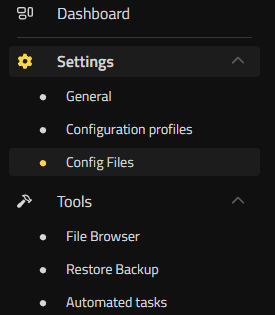
Locate the “Config Files” option in your Nitrado Web Interface. - Select the
serverDZ.cfgfile. You can now start modifying its parameters.

Select the serverDZ.cfg file to begin editing. - When you finish with your changes, remember to save the settings and then restart your server to apply them.
Note: you do not have to edit the file for every change. The settings people adjust most, including the server name, password, whitelist, voice chat and the admin logs, are also form fields in Settings > General.
Please keep in mind: Our support team does not assist with custom configurations and can only guarantee proper server functionality with vanilla settings. If you encounter issues with custom settings, you may need to revert to default or troubleshoot yourself.
Understanding serverDZ.cfg Parameters
Below is a list of the parameters in your serverDZ.cfg file and what each one does. Most lines in the file carry a short comment explaining themselves, so the file is easier to read than its length suggests.
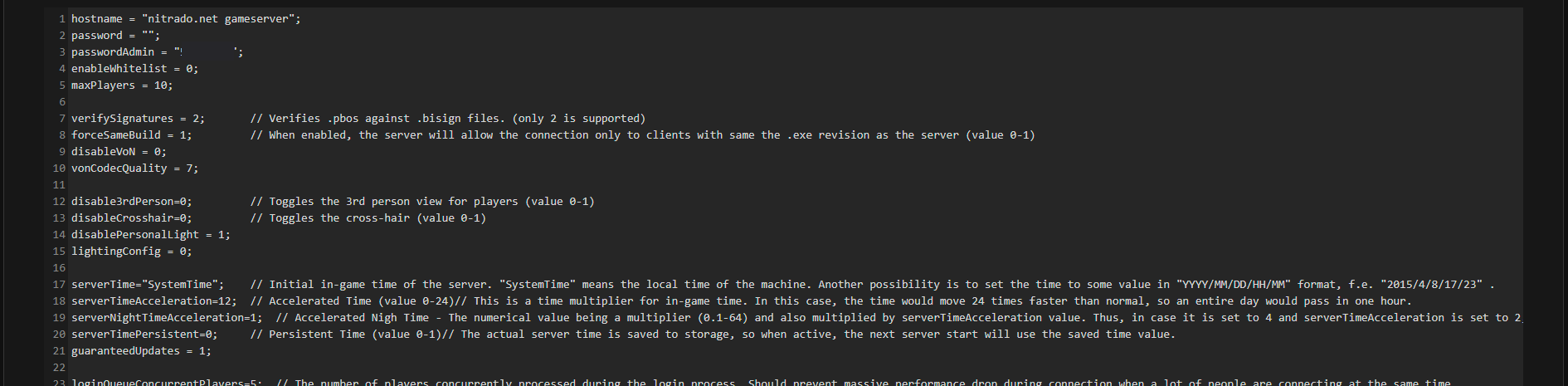
hostname = "nitrado.net gameserver";- Sets the server name players see in the game’s server browser.
password = "";- Sets a password players need to join your server. Leave it empty for an open server.
passwordAdmin = "";- Sets the password you use to identify yourself as an admin in game. To log in, type
#login your-admin-passwordin the in-game chat. enableWhitelist = 0;- Turns the whitelist on. Set it to
1to allow only the player IDs listed inwhitelist.txt. maxPlayers = 10;- Sets the player limit. It matches the slot count on your plan, so raising it above the number of slots you rent will not add capacity.
verifySignatures = 2;- Verifies .pbos against .bisign files. Only
2is supported. forceSameBuild = 1;- Allows connections only from clients running the same .exe revision as the server. Valid values are
0and1. disableVoN = 0;- Turns in-game voice chat off. Valid values are
0and1. vonCodecQuality = 7;- Sets the quality of the voice codec on a scale of 1 to 30.
disable3rdPerson=0;- Toggles the third person view for players. Valid values are
0and1. disableCrosshair=0;- Toggles the crosshair. Valid values are
0and1. disablePersonalLight = 1;- Disables the personal light that every client carries.
lightingConfig = 0;- Controls how dark the nights are. The matching control is the Night-Lighting dropdown in Settings > General.
serverTime="SystemTime";- Sets the starting in-game time.
"SystemTime"uses the local time of the machine. You can also pin it to a fixed moment in"YYYY/MM/DD/HH/MM"format, for example"2015/4/8/17/23". serverTimeAcceleration=12;- Multiplies in-game time on a scale of 0 to 24. At
24, a full in-game day passes in one hour. serverNightTimeAcceleration=1;- Multiplies night time on a scale of 0.1 to 64, applied on top of the
serverTimeAccelerationvalue. serverTimePersistent=0;- Saves the current server time to storage. With it on, the next server start picks up where the last one left off. Valid values are
0and1. loginQueueConcurrentPlayers=5;- Sets how many players the server processes at once during login. It exists to stop a performance drop when a lot of people connect at the same time.
loginQueueMaxPlayers=500;- Sets how many players can wait in the login queue.
instanceId = 1;- Identifies your server instance and the storage folder holding its persistence files.
storeHouseStateDisabled = false;- Turns off house and door persistence. It takes
trueorfalse, and it is there for cases where persistence causes problems. storageAutoFix = 1;- Checks the persistence files for corruption and replaces corrupted ones with empty files. Valid values are
0and1. steamport = 11105;andsteamqueryport = 11101;- Nitrado sets both values.
steamqueryportmatches the Query Port shown on your Dashboard. Leave them as they are. adminLogPlayerHitsOnly = 0;- Logs only damage done by players. At
0the server logs all hits, including animals and infected. adminLogPlacement = 0;- Logs placement actions, such as traps and tents.
adminLogBuildActions = 0;- Logs build actions such as build, dismantle and destroy.
adminLogPlayerList = 0;- Logs a player list with positions every 5 minutes.
class Missions { class DayZ { template="dayzOffline.chernarusplus"; }; };- Chooses the map your server runs.
dayzOffline.chernarusplusis the vanilla mission anddayzOffline.enochis the DLC mission. You can also pick the map from the Mission dropdown in Settings > General.
Further down the file sit the damage, respawn and mod switches. Each one has a toggle in Settings > General, which is the safer place to change them:
disableBaseDamage- Disables damage and destruction of fences and watchtowers.
disableContainerDamage- Disables damage and destruction of tents, barrels, wooden crates and sea chests.
disableRespawnDialog- Spawns players with a random character or the character from the main menu, instead of showing them the choice.
disableRespawnInUnconsciousness- Removes the Respawn button from the pause menu while a player is unconscious.
enableCfgGameplayFile- Switches on the
cfggameplay.jsonconfig file. Turning it on overwritesdisableBaseDamage,disableContainerDamage,disableRespawnDialog,disablePersonalLightandlightingConfig, so set those insidecfggameplay.jsononce it is active. filePatching- Controls unpacked data. With file patching off, only PBOs load. Some mods and custom content need it on.
Pro Tip: turn on Show internal names (like in the configuration file) at the top of Settings > General. The panel then prints each setting’s config name beside it, so you can match the form to the file at a glance.


Ready to fine-tune your DayZ experience?
FAQ – Nitrado DayZ Server Configuration
Where do I edit the settings for my DayZ server on Nitrado?
To change your DayZ server settings, log in to your Nitrado Web Interface:
- Go to Settings > Config Files.
- Open
serverDZ.cfgto access core server configuration options. - Make your changes, then save and restart the server to apply them.
What is serverDZ.cfg and why is it important?
The serverDZ.cfg file contains the main configuration for your DayZ server. It allows you to customize:
- Server name and password
- Admin password and whitelist
- Max player count
- Voice chat settings
- Time and day cycle speed
- Admin logging
This file directly influences how your server runs and appears to players.
How do I set myself or others as an admin?
Open serverDZ.cfg in the Config Files section. Find the line:
passwordAdmin = "your-admin-password";In-game, press Enter and type:
#login your-admin-passwordThis grants you access to in-game admin commands like kicking players or using admin tools.
How do I change the Message of the Day (MOTD)?
Server messages live in messages.xml, not in serverDZ.cfg. Open Settings > Config Files and pick messages.xml from the file selector.
Each message sits in its own <message> block. A message that greets players two minutes after they connect looks like this:
<message>
    <delay>2</delay>
    <onconnect>1</onconnect>
    <text>Welcome to my server #name</text>
</message>
A message that repeats every 15 minutes for everyone on the server looks like this:
<message>
    <repeat>15</repeat>
    <text>You are playing on my server (#name).</text>
</message>
#name is replaced with your server name. In a shutdown message, #tmin is replaced with the minutes remaining. The file ships with commented examples covering countdown shutdowns, repeating messages and connect messages, so the fastest start is to copy one and edit the text.
How do I change the player limit on my DayZ server?
In serverDZ.cfg, modify the line:
maxPlayers = 10;Set it to the number of slots on your plan. Raising it higher does not add capacity, so if you need more players, change the slot count on your plan first.
Can I turn off voice chat or adjust its quality?
Yes. In serverDZ.cfg, use the following:
disableVoN = 0;         // 0 = Enabled, 1 = Disabled
vonCodecQuality = 7;    // 1 (lowest) to 30 (highest)
These settings control whether voice chat is allowed and its sound quality.
How do I make my server persistent (loot/base saving)?
DayZ saves your world by default, so there is no persistence switch to turn on. The two persistence keys in serverDZ.cfg both exist for fixing problems, not for enabling saving:
storeHouseStateDisabled = false;  // set true only if house and door persistence misbehaves
storageAutoFix = 1;               // replaces corrupted persistence files with empty ones
⚠️ Before making changes to your DayZ server, we recommend making a backup.
How do I speed up or slow down the day cycle?
In serverDZ.cfg, use the two time multipliers:
serverTimeAcceleration=12;       // 0-24, how much faster in-game time runs
serverNightTimeAcceleration=1;   // 0.1-64, applied on top of the value above
At 24, a full in-game day passes in one hour. Save the file and restart the server to apply it.
How do I kick or ban players as an admin?
Once logged in as admin in-game using #login password, use these commands:
- Kick:
#kick playerName - Ban:
#ban playerName - Logout:
#logout
I changed settings but nothing happened. What now?
After saving changes in the config file, you must restart your server for them to apply. Make sure the syntax is correct. Errors in formatting can cause settings to fail silently.
Does Nitrado Support help with custom configurations?
Nitrado Support can only guarantee server functionality with vanilla (default) settings. If you modify configuration files manually, you’re responsible for testing and troubleshooting them. For issues related to broken configurations, you can try:
- Reverting to default
- Restoring a backup
- Checking community forums or DayZ documentation
How to Configure Your DayZ Server on Nitrado
Accessing DayZ Server Configuration Files
Understanding serverDZ.cfg Parameters
FAQ – Nitrado DayZ Server Configuration
- Where do I edit the settings for my DayZ server on Nitrado?
- What is serverDZ.cfg and why is it important?
- How do I set myself or others as an admin?
- How do I change the Message of the Day (MOTD)?
- How do I change the player limit on my DayZ server?
- Can I turn off voice chat or adjust its quality?
- How do I make my server persistent (loot/base saving)?
- How do I speed up or slow down the day cycle?
- How do I kick or ban players as an admin?
- I changed settings but nothing happened. What now?
- Does Nitrado Support help with custom configurations?


