My Credits £0.00
-
- gameserver
'837 Days to DieAmerican Truck SimulatorARK: Survival AscendedARK: Survival EvolvedARK: Survival Evolved Official Save GameARK: Survival of the FittestArma 2Arma 3Arma ReforgerAssetto Corsa CompetizioneAstroneerAtlasAvorionBattlefield HardlineChivalry 2CitadelConan ExilesCounter-Strike: Global OffensiveCraftopiaDark and LightDayZDon't Starve TogetherDUCKSIDEDune: AwakeningEchoes of ElysiumECOEmpyrionEnshroudedEuro Truck Simulator 2FactorioFarming Simulator 17Farming Simulator 19Farming Simulator 22Farming Simulator 25FiveMFrozen FlameGarry's ModHalf-Life 2 DeathmatchHell Let LooseHytaleICARUSLast OasisLeft 4 Dead 2Life is FeudalLOTR: Return to MoriaMedieval EngineersMinecraftMordhauMyth of EmpiresOutpost ZeroPalworldPath of TitansPixARKProject ZomboidRed Orchestra 2RedMRetired GamesRisk of Rain 2RuneScape: DragonwildsRustRust ConsoleSatisfactorySCP - Secret LaboratorySCUMSniper Elite: ResistanceSons Of The ForestSoulmaskSpace EngineersStarRuptureSubsistenceTerrariaThe ForestThe IsleUnturnedV RisingValheimWindroseWreckfestYlandsZescape -
- webinterface
AccountCustomer SupportFTPOther ServicesSecurity
- GAMESERVER
'837 Days to DieAmerican Truck SimulatorARK: Survival AscendedARK: Survival EvolvedARK: Survival Evolved Official Save GameARK: Survival of the FittestArma 2Arma 3Arma ReforgerAssetto Corsa CompetizioneAstroneerAtlasAvorionBattlefield HardlineChivalry 2CitadelConan ExilesCounter-Strike: Global OffensiveCraftopiaDark and LightDayZDon't Starve TogetherDUCKSIDEDune: AwakeningEchoes of ElysiumECOEmpyrionEnshroudedEuro Truck Simulator 2FactorioFarming Simulator 17Farming Simulator 19Farming Simulator 22Farming Simulator 25FiveMFrozen FlameGarry's ModHalf-Life 2 DeathmatchHell Let LooseHytaleICARUSLast OasisLeft 4 Dead 2Life is FeudalLOTR: Return to MoriaMedieval EngineersMinecraftMordhauMyth of EmpiresOutpost ZeroPalworldPath of TitansPixARKProject ZomboidRed Orchestra 2RedMRetired GamesRisk of Rain 2RuneScape: DragonwildsRustRust ConsoleSatisfactorySCP - Secret LaboratorySCUMSniper Elite: ResistanceSons Of The ForestSoulmaskSpace EngineersStarRuptureSubsistenceTerrariaThe ForestThe IsleUnturnedV RisingValheimWindroseWreckfestYlandsZescape- WEBINTERFACE
AccountCustomer SupportFTPOther ServicesSecurity
Guides

Connect to a Path of Titans Server

Rent a prepaid Path of Titans Gameserver now at nitrado.net
How to connect to a Path of Titans server
This guide will show you how to connect to your server in 3 easy steps.
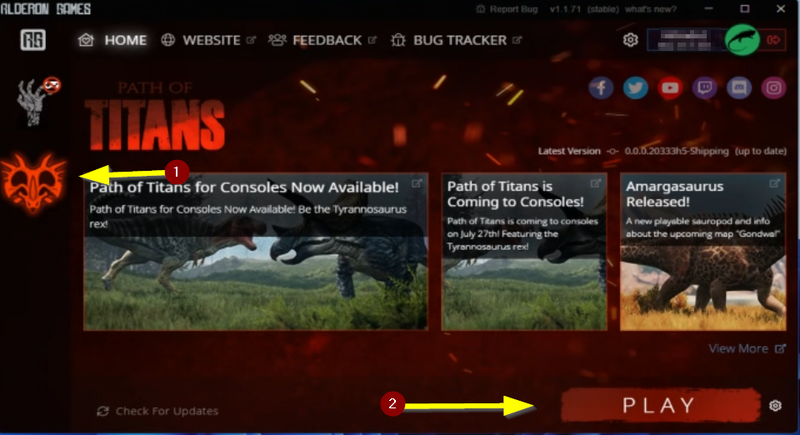
Step 1: Open the Alderon Games Launcher, select the game Path of Titans ( 1 ) on the left and click the “Play” button ( 2 ) to start the game.
Step 2: To connect to your server, now click on the Community Server tab.
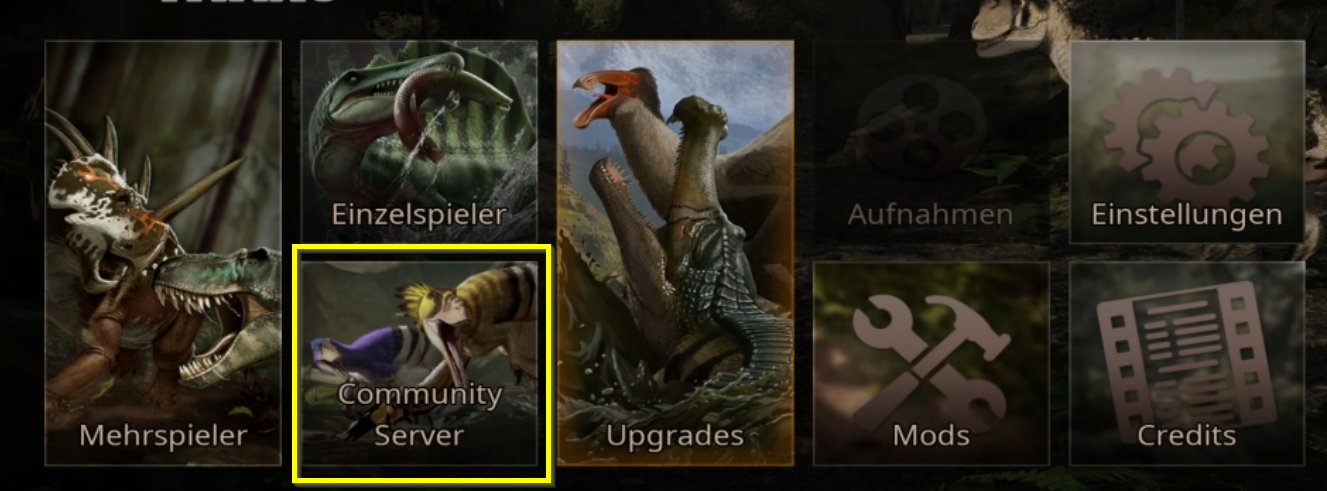
Step 3: Now the server list opens.
Enter your server name under “Server name” and click on “Update”.
Now select your server, click on “Confirm” and you will connect to your server.
Grab your very own game server now.



inDevelopment: false
inQA: false
inStaging: false
inProduction: true
spec. env: production
Active features: checkout-payment-list_a, custom-runtime_a, games-overview-link_a, partner-logos_a, show-arksaca-info, strapi-marketing-slides, use-ingenico-paypal, withdrawal-services