Guides

How to Become Admin in Don’t Starve Together
Become an Admin on Your Don’t Starve Together Server
Running a Don’t Starve Together server for your group works best when someone can spawn supplies, adjust the world, or handle a troublesome player. Admin access runs on your Klei User ID, not your Steam ID, so the first step is tracking that ID down. In this Nitrado guide, we’ll show you how to find your Klei User ID and add it to adminlist.txt to grant admin access.
Find Your Klei User ID
Open Don’t Starve Together and click Account on the main menu. This takes you straight to the Klei account page. You can also go there directly by visiting accounts.klei.com in a browser.
On the Klei account page, find your Klei User ID under User Info.
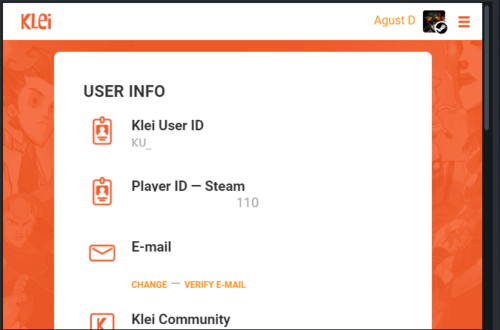
Note: Ignore the Player ID field. That’s your SteamID64, and Don’t Starve Together does not use it to grant admin access.
Add Your Klei User ID to the Admin List
- Open your Nitrado Web Interface for your Don’t Starve Together server and stop it.
- Under Tools, click File Browser.
- Open the
dontstarvefolder. - Create a new file named
adminlist.txt. - Add your Klei User ID and any other admins’ Klei User IDs, one per line.
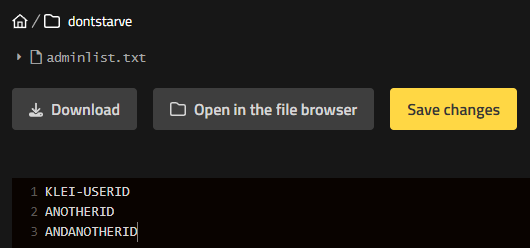
- Click Save changes, then restart the server.
Confirm Your Admin Access
To check if it worked, join your server and press Tab to open the player menu. Admins show a gray star next to their picture.
Time to Take Charge
With your Klei User ID added to adminlist.txt, you’re ready to spawn supplies, adjust the world, or step in whenever your server needs a steady hand. Share the file with any other admins you want to add, then head back into the world with your new authority. See our Don’t Starve Together Admin Commands guide to put that authority to work. 🔥


