Guides
Minecraft – Server.properties Guide
Your Minecraft server is a highly customizable game, including the base settings for your multiplayer world. These range from whitelists to resource packs, along with tons of other options. Having the ability to edit and change these features helps you create that perfect server you always wanted. In this Nitrado guide, we’ll explain all the latest settings in the server.properties file for your Minecraft server.
How to Edit Server.properties
- Head towards your Nitrado Web Interface for the Minecraft server.
- Navigate to
Settings>Config Fileson the left of your Dashboard.
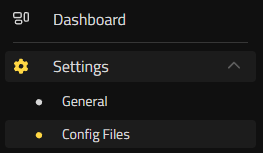
- Select
server.propertiesand begin editing the file.
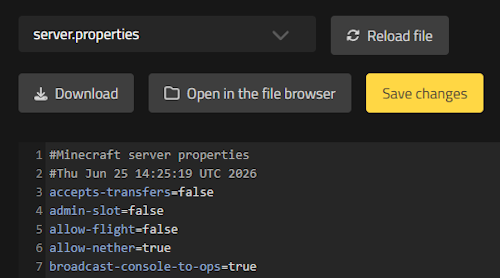
- Afterwards, click
Save Changesand restart the server.
Now that you know how to edit the settings, here’s a full breakdown of each option.
Server Settings
level-name=world
Sets the name of the world and its corresponding save folder. If you wish to upload your own world, you can enter its folder name here. Example: If the world folder is named “spawn”, you must write “spawn” here (without quotes).
server-ip=
Binds the server to a specific IP address. Leaving this blank is recommended for most users, as Nitrado handles the binding automatically for you.
server-port=25565
The port the server listens on for connections. The default is 25565, which allows players to connect by entering just the IP address. This port can only be changed by the Nitrado support team.
query.port=25565
The port used for the server query protocol if enable-query is set to true.
enable-query=true
Whether the GameSpy4 protocol listener is enabled or not. This is used by external server lists to pull basic status data and player counts from the server.
enable-status=true
Controls the privacy of the server list. If set to false, the server will appear as “offline” on player server lists, but it will still allow players to connect directly via IP.
max-players=8
Sets the maximum number of players who can connect and play on the server simultaneously.
white-list=false
If set to true, only players whose names have been added to the server’s whitelist can join the server.
enforce-whitelist=false
When set to true, players who are online but not present on the whitelist get kicked immediately whenever the admin reloads the whitelist file.
online-mode=true
When set to true, the server authenticates connecting accounts with Mojang’s session servers. Only players who have actually bought the game can join (blocking cracked/unlicensed accounts).
enforce-secure-profile=true
When set to true, players without a Mojang-signed public key cannot connect to the server. This is a requirement for the vanilla chat reporting system.
log-ips=true
Determines whether player IP addresses appear in the server console log messages and saved log files.
op-permission-level=4
Sets the default permission level for operators (OPs):
- 1 = Can bypass spawn-protection.
- 2 = Can use cheat commands (/clear, /difficulty, /effect, /gamemode, /gamerule, /give, /tp) and edit command blocks.
- 3 = Access to standard moderation commands (/ban, /deop, /kick, and /op).
- 4 = Full access to all administrative commands, including /stop and /save-all.
player-idle-timeout=0
Kicks players automatically after a specified number of minutes of inactivity. Set to 0 to disable idle kicking entirely.
pause-when-empty-seconds=-1
Determines how many seconds pass after the last player disconnects before the server entirely pauses its world simulation. Set to -1 to keep the server running constantly.
enable-rcon=false
Enables a remote console (RCON) for your server. After setting this value to true and restarting the server, two additional mandatory properties will appear (rcon.password and rcon.port).
motd=nitrado.net gameserver
The Message Of The Day. This is the custom description displayed directly below the server name in the client’s multiplayer server list.
accepts-transfers=false
Controls whether the server accepts incoming player transfers from other servers using the vanilla /transfer packet network.
management-server-enabled=false
Toggles whether the Minecraft Server Management Protocol API is enabled for advanced external server tracking.
World Settings
level-type=minecraft:normal
Sets the world generation preset. Possible string values include:
minecraft:normal– Standard world with hills, valleys, water, and structures.minecraft:flat– A flat world with no natural terrain features; primarily used for creative building.minecraft:large_biomes– Same as normal, but all individual biomes are heavily upscaled.minecraft:amplified– Standard generation but with heavily increased height constraints, resulting in towering cliffs.minecraft:single_biome_surface– A custom map where the entire overworld consists of a single chosen biome.
generator-settings={}
Used to adjust custom world parameters (such as flat world layers or single biome choices) utilizing a JSON string format.
level-seed=
Enter a specific seed for world generation here. Alphanumeric strings can be used. If left completely blank, the server will generate a random world seed.
generate-structures=true
Defines whether structures such as villages, trial chambers, strongholds, and dungeons generate in newly discovered chunks.
initial-enabled-packs=vanilla
A comma-separated list of data packs to be automatically enabled upon the creation of a brand new world.
initial-disabled-packs=
A comma-separated list of data packs that should be explicitly skipped and not auto-enabled during initial world generation.
Client Settings
gamemode=survival
The default game mode for every player joining the server. Legitimate string values are survival, creative, adventure, and spectator. Individual players can still have their mode changed using the /gamemode command if they have OP rights.
force-gamemode=false
Whether to force the default server game mode on every player upon reconnection, overriding whatever game mode they were in when they logged out.
resource-pack=
Allows you to enter a direct download URL for a server-side resource pack. The client will prompt the player to automatically download and install it when joining.
view-distance=8
Sets the maximum distance (measured in chunks) of world data sent from the server to the client.
simulation-distance=10
Sets the chunk radius around players where the server actively processes entities, blocks, and ticking. Lowering this value from the default can massively reduce server lag without reducing visual chunk distances.
entity-broadcast-range-percentage=100
Controls the maximum distance entities need to be from players before being rendered, expressed as a percentage. Lowering this value can prevent performance drops in environments with high entity counts.
difficulty=easy
Defines the server’s default difficulty level. Legitimate values are peaceful, easy, normal, and hard.
hardcore=false
If set to true, the server difficulty is locked to hard, and players are permanently shifted into Spectator mode upon dying rather than being allowed to respawn.
allow-flight=false
Determines if players are allowed to fly in Survival mode while using flight mods. If set to false, any player floating or flying in the air for more than 5 consecutive seconds will be kicked automatically for flying.
hide-online-players=false
If set to true, the server will refuse to send the list of online player names when a client pings it from the multiplayer menu screen.
Legacy Settings Migrated to Game Rules
In recent editions of Minecraft, several options were completely removed from the server.properties file and migrated into the game rules system. This transition allows server operators to toggle these mechanics dynamically using commands without requiring a server reboot. Just make sure to be OP to use these commands in-game.
Do not add the following options to your properties file, as they are no longer recognized.
- allow-nether / hellworld ➔ Replaced by
/gamerule allowEnteringNetherUsingPortals <true|false> - pvp ➔ Replaced by
/gamerule pvp <true|false> - enable-command-block ➔ Replaced by
/gamerule enableCommandBlocks <true|false> - spawn-monsters / monsters ➔ Replaced by
/gamerule spawnMonsters <true|false> - spawn-animals / no-animals ➔ Controlled globally by entity spawning tags and mob spawning game rules.
- spawn-npcs ➔ Managed via entity control configurations and localized village mechanics.
There you have it – all of the options in the server.properties file for your Minecraft server! Tweak them anytime and personalize your experience in-game. Invite your friends once you created the perfect server, then go on wild adventures 👏
How to Edit Server.properties
Server Settings
World Settings
Client Settings
Legacy Settings Migrated to Game Rules


