Guides
How to Change ARK Day Night Cycle
Watching the sun go down on your ARK: Survival Ascended server should feel like part of the adventure, not a timer you have no say over. If your days run out before anyone finishes building, or your nights drag on until every session turns into a fight against whatever is hunting in the dark, you can slow the cycle down or speed it up to match how your tribe actually plays.
ARK: Survival Ascended does not expose these settings in the Nitrado Web Interface, so changing them means editing your server’s configuration file directly. In this Nitrado guide, we’ll show you how to change the day and night cycle on your ARK: Survival Ascended server, and what each of the three settings that control it actually does.
Change the Day and Night Cycle Settings
The configuration lines for the day and night cycle are not in the file by default, so you need to add them yourself. Follow these steps and you can make the change without disturbing the rest of your configuration.
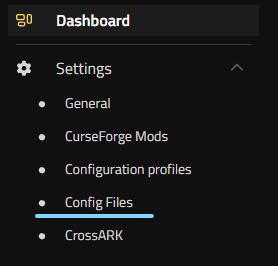
- To the left of your Web Interface, in the Settings section, find Config Files.
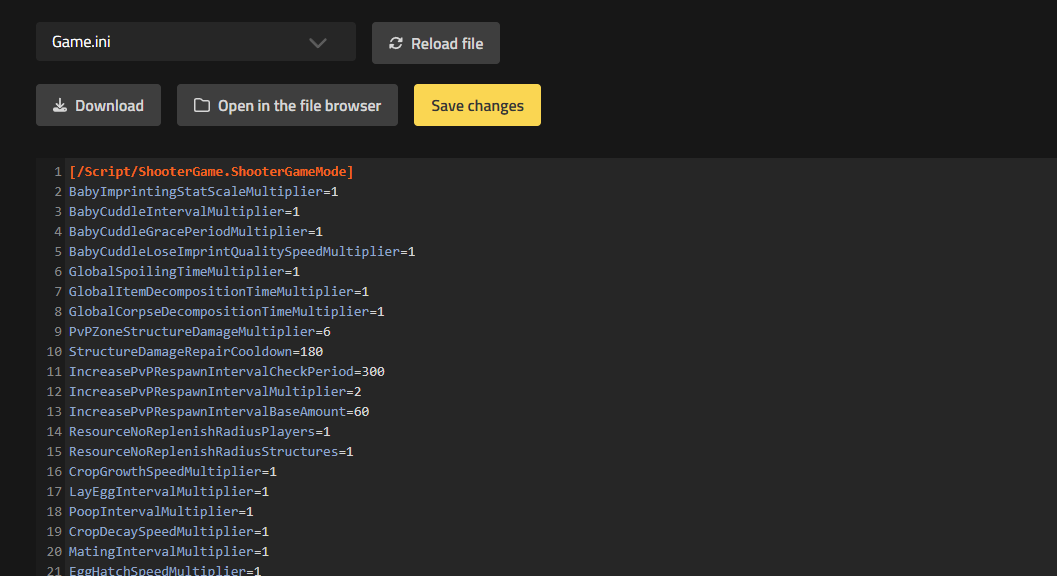
- Click into Config Files and you will see the window listing every editable function on your server.
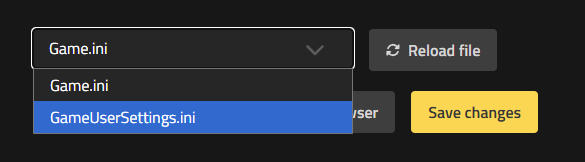
- At the top, change the tab from Game.ini to GameUserSettings.ini.
- The file contents load automatically. Look for the section that says
[ServerSettings]. - Scroll to the bottom of that section and add the following lines:
DayCycleSpeedScale=1
DayTimeSpeedScale=1
NightTimeSpeedScale=1
- Set the values you want for the day, the night, or the complete cycle, then save your changes.

- Restart the server for the settings to be correctly applied.
With the lines in place, it is time to set them to the values that suit your server. Here is what each one does.
| Setting | What It Controls | Effect |
|---|---|---|
DayCycleSpeedScale |
The pace of the entire day and night cycle | Default 1 matches solo play and official servers, where a full cycle lasts about 1 hour in real time. Values below 1 slow the whole cycle down; values above 1 speed it up. |
DayTimeSpeedScale |
The length of daylight relative to night | Lower values make each day longer. Higher values make each day shorter. |
NightTimeSpeedScale |
The length of night relative to day | Lower values make each night longer. Higher values make each night shorter. |
Own the Clock on Your Server
You have added DayCycleSpeedScale, DayTimeSpeedScale, and NightTimeSpeedScale to the [ServerSettings] section of your GameUserSettings.ini file, and restarted your server to apply them. Whether you cut the nights short to keep raids fair or stretch the days out for longer building sessions, the pace of your ARK: Survival Ascended world is now yours to set.
Guides That May Interest You
- How to Enable ARK: Survival Ascended Console
- Enabling ARK: Survival Ascended Creative Mode
- ARK: Survival Ascended Optimization Tips
Frequently Asked Questions About the Day and Night Cycle
How Do I Change the Day and Night Cycle on My ARK: Survival Ascended Server?
ARK: Survival Ascended does not offer these controls in the Web Interface. Add DayCycleSpeedScale, DayTimeSpeedScale, and NightTimeSpeedScale to the [ServerSettings] section of your GameUserSettings.ini file, set the values you want, then save and restart your server. The steps above cover the full walkthrough.
What Do the Three Time Settings Actually Do?
DayCycleSpeedScale sets the pace of the entire day and night cycle. DayTimeSpeedScale and NightTimeSpeedScale each control one phase on its own, so you can lengthen or shorten day and night independently. The table above gives the exact effect of each.
What Is a Good Day and Night Cycle for PvE Servers?
For casual or PvE play, many admins start with:
DayCycleSpeedScale=0.8
DayTimeSpeedScale=0.5
NightTimeSpeedScale=2.0
This stretches out daylight for building and exploring while cutting down the time spent in the dark. Treat it as a starting point rather than a fixed rule, and adjust it to match your tribe’s preference.
My Nights Are Too Long. How Do I Fix That?
Raise NightTimeSpeedScale, for example to 2.5, to make night pass faster. You can also lower DayCycleSpeedScale if you want a longer overall cycle with a shorter night inside it.
Do I Need to Restart My Server After Making Changes?
Yes. Restart your ARK: Survival Ascended server after every change to GameUserSettings.ini so the new settings take effect.
What Is the Difference Between DayCycleSpeedScale and the Day and Night Values?
DayCycleSpeedScale adjusts the overall pace of day and night together. DayTimeSpeedScale and NightTimeSpeedScale each adjust their own phase independently. Combine all three for precise control, for example a slower overall cycle with longer days and shorter nights.
Change the Day and Night Cycle Settings
Own the Clock on Your Server
Guides That May Interest You
Frequently Asked Questions About the Day and Night Cycle
- How Do I Change the Day and Night Cycle on My ARK: Survival Ascended Server?
- What Do the Three Time Settings Actually Do?
- What Is a Good Day and Night Cycle for PvE Servers?
- My Nights Are Too Long. How Do I Fix That?
- Do I Need to Restart My Server After Making Changes?
- What Is the Difference Between DayCycleSpeedScale and the Day and Night Values?


