Guide

Impostazioni del Loot in DayZ: Quantità, Livelli e Tempo di Respawn
Introduzione alle impostazioni del loot in DayZ
Nel tuo hosting per server DayZ, ti ritroverai in un mondo horror, con zombie dietro ogni angolo. Raccogliere risorse e sopravvivere può sembrare quasi impossibile quando il loot scarseggia, il che scoraggia i nuovi giocatori che non sanno che la soluzione si trova proprio nei file del server. Come proprietario di un server DayZ, controlli le impostazioni del loot direttamente tramite il file types.xml, e modificarle cambia quanto il tuo server risulti permissivo o spietato per chiunque vi si unisca.
Le impostazioni del loot in DayZ ti permettono di personalizzare le possibilità di comparsa per ogni oggetto ed equipaggiamento sul tuo server: quanti esemplari di un oggetto compaiono, a quale livello di loot appartiene e ogni quanto tempo ricompare dopo essere stato raccolto. Di seguito ti mostreremo dove si trova il file types.xml, esamineremo ogni opzione al suo interno e spiegheremo esattamente come funzionano i livelli di loot e i tempi di respawn in DayZ, così potrai costruire un server su misura per i tuoi giocatori.
Da dove iniziare: trovare il file Types.xml
Per iniziare, dovrai trovare il file types.xml di DayZ prima di poter modificare qualsiasi impostazione del loot. Segui questi passaggi per trovarlo e aprirlo per la modifica:
- Per prima cosa, vai alla Interfaccia Web Nitrado del tuo server DayZ.
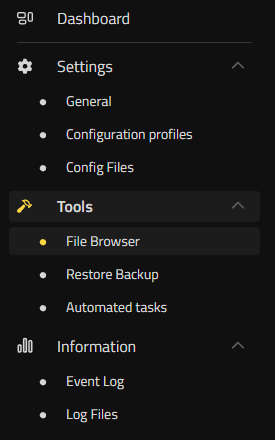
- Poi, sul lato sinistro sotto “Tools“, clicca su “File Browser“.
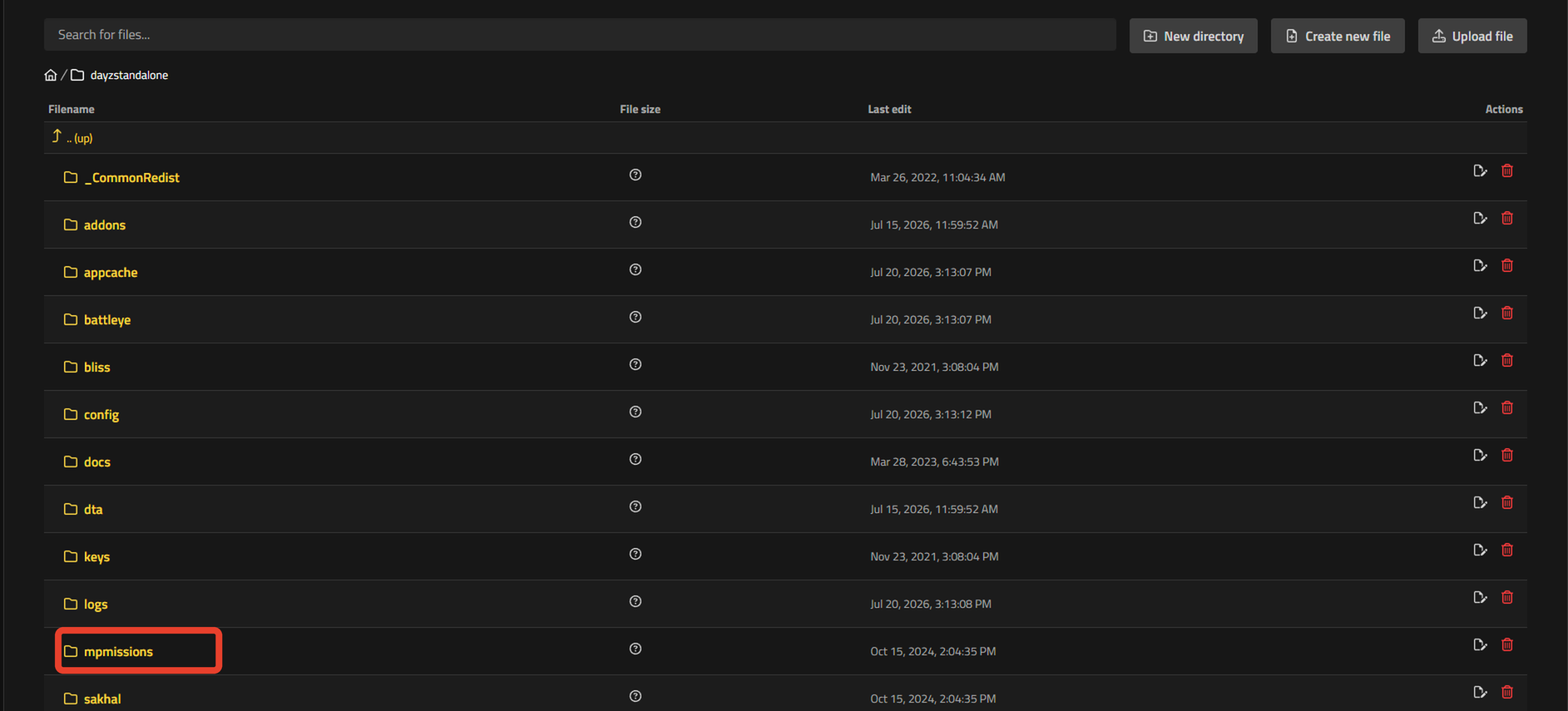
- Nel file browser di DayZ, vai al percorso dayzstandalone ➜ mpmissions ➜ dayzOffline.chernarusplus ➜ db ➜ types.xml.
- Ora puoi cliccare per modificare il tuo file “types.xml” e iniziare a modificare il loot del tuo server.
Se il tuo server utilizza una mappa diversa, il nome della cartella cambia: Livonia usa dayzOffline.enoch e Sakhal usa dayzOffline.sakhal al posto di dayzOffline.chernarusplus.
Le impostazioni del loot in DayZ spiegate (opzioni di Types.xml)
Dopo aver aperto il file types.xml, troverai migliaia di righe che coprono ogni oggetto ed equipaggiamento del gioco. Per essere precisi, il file supera le 20.000 righe di opzioni.
All’interno di questo file, ti consigliamo di usare la scorciatoia da tastiera “CTRL” + “F” per aprire una ricerca e trovare rapidamente l’oggetto che vuoi modificare.
Ora puoi iniziare a modificare ogni opzione per quell’oggetto specifico. Di seguito scoprirai cosa fa ciascuna opzione e come influisce sul loot del tuo server.
| Opzione | Descrizione |
|---|---|
| nominal | Imposta il numero target di quell’oggetto che la Central Economy cerca di mantenere attivo sulla tua mappa in un dato momento. Aumenta questo valore per incrementare la quantità complessiva di quell’oggetto che compare. |
| min | Imposta la soglia minima che attiva un respawn. Quando il numero attuale di un oggetto scende fino a min o al di sotto, la Central Economy inizia a farne comparire altri fino a riportarlo verso nominal. |
| restock | Controlla il ritmo di quel respawn. Un valore di restock pari a 0 significa che l’oggetto ricompare in blocco al prossimo ciclo economico del server. Un valore positivo indica il numero di secondi che il server attende prima di far comparire un singolo oggetto aggiuntivo, ripetendo il processo finché non si raggiunge nominal. |
| lifetime | Imposta per quanto tempo, in secondi, un oggetto rimane a terra dopo essere comparso prima di sparire se nessuno lo raccoglie. |
| quantmin | Imposta la percentuale minima di riempimento con cui compare un oggetto consumabile, come casse di munizioni o bottiglie d’acqua. Un valore di -1 significa che la quantità non si applica affatto a quell’oggetto, il che è normale per equipaggiamento senza un livello di riempimento, come armi o attrezzi. |
| quantmax | Imposta la percentuale massima di riempimento con cui può comparire un consumabile. Come per quantmin, un valore di -1 significa che la quantità non si applica a quell’oggetto. |
| cost | Imposta un peso di priorità di comparsa (predefinito 100), usato solo per risolvere i casi in cui più oggetti idonei competono per lo stesso slot di loot. Per controllare la frequenza con cui un oggetto compare, modifica invece nominal, min e restock. |
| category name | Imposta una categoria per l’oggetto che influisce su dove e come compare. Le opzioni includono Weapons, Tools, Containers, Clothes e altre. |
| usage name | Imposta il gruppo di zone in cui un oggetto può comparire, come Farm, Industrial, Medic, Hunting, Military e altre. |
| value name | Imposta il livello di loot di un oggetto, da Tier1 a Tier4, che controlla quanto lontano dalla costa o quanto in profondità nel territorio militare può comparire. |
Una volta terminato di modificare le opzioni per i tuoi oggetti DayZ, premi “Save changes” e riavvia il tuo server DayZ per applicarle.
Come aumentare la comparsa del loot sul server DayZ (Nominal e Min)
Ecco come aumentare la comparsa del loot sul tuo server DayZ: nominal e min sono i due campi da modificare per primi. Aumentare nominal incrementa direttamente il numero target di quell’oggetto in circolazione sulla mappa. Cambia il nominal di un AK74 da 10 a 20, e la Central Economy cercherà di mantenerne il doppio nel mondo di gioco. Aumenta anche min di conseguenza, usando all’incirca il 50-70% del nuovo valore di nominal, così l’oggetto ricomincia a comparire non appena il numero scende, invece di aspettare che la mappa sia quasi vuota. Un nominal di 20 con un min di 12, ad esempio, mantiene un flusso costante di quell’oggetto senza riempire ogni edificio in una volta sola. Porta inoltre restock a 0, e il loot raccolto tornerà in blocco al ciclo economico successivo invece di attendere un timer.
I livelli di loot in DayZ spiegati (Value Tier1-Tier4)
Il campo value nel file types.xml assegna un oggetto a un livello di loot, denominato da Tier1 a Tier4. Tier1 copre il lato costiero della mappa, a basso valore: equipaggiamento civile comune come vestiti, cibo in scatola e attrezzi di base. Tier4 si trova all’estremità opposta, e copre le zone ad alto valore nell’entroterra profondo e intorno alle installazioni militari, dove compaiono le armi, gli ottici e le armature migliori. Tier2 e Tier3 riempiono lo spazio intermedio, distribuendo equipaggiamento di medio valore tra le città dell’entroterra e le aree industriali.
Value funziona insieme al campo usage, non lo sostituisce. Usage imposta il tipo di zona in cui un oggetto può comparire (Military, Medic, Farm, Industrial e altre), mentre value stabilisce quanto in profondità nella mappa deve trovarsi quella zona prima che l’oggetto compaia. Un fucile d’assalto, ad esempio, ha tipicamente un usage pari a Military insieme a un value pari a Tier3 o Tier4, quindi compare solo negli edifici contrassegnati come militari che si trovano anche in quei livelli più alti. Aggiungi un valore di tier più basso a quello stesso oggetto, e inizierà a comparire anche negli edifici militari più vicini alla costa.
Dove compare ogni livello di loot (mappa del loot di DayZ)
Ogni livello di value corrisponde a zone reali sul terreno, e la loro posizione cambia in base alla località, senza seguire una regola universale. Su Chernarus, i livelli vanno dalla costa orientale e meridionale, attraverso le città dell’entroterra, fino al nord ricco di presenza militare: la stessa mappa del loot analizzata zona per zona nella Guida alla mappa Chernarus di DayZ: esplorare le zone per livello di bottino. Modificare i tag value nel file types.xml cambia cosa compare e dove, senza spostare i confini di quelle zone.
Ogni quanto ricompare il loot in DayZ?
Il respawn del loot in DayZ è controllato dai campi min e restock che imposti per ogni oggetto, insieme a una condizione che non imposti affatto nel file types.xml: i giocatori devono trovarsi abbastanza lontani dal punto di comparsa perché la Central Economy possa agire. Quando il numero attuale di un oggetto scende fino al suo valore di min o al di sotto, il server lo segna come pronto per il respawn. Da quel momento, restock determina i tempi: un restock pari a 0 fa ricomparire l’intero lotto fino a raggiungere nominal al ciclo economico successivo del gioco, mentre un valore di restock positivo indica il numero di secondi che il server attende prima di aggiungere un singolo oggetto, ripetendo il processo finché non si raggiunge di nuovo nominal. Lifetime funziona insieme a entrambe le impostazioni, non contro di esse. Controlla solo per quanto tempo un oggetto non toccato sopravvive a terra prima di sparire, quindi un lifetime breve elimina più rapidamente gli oggetti vecchi, ma non ha alcun effetto sulla velocità con cui ne compaiono di nuovi.
Perché il loot ricompaia davvero vicino a un edificio o un’area, i giocatori devono generalmente stare ben lontani da quel punto per l’intera durata del timer di restock. Se lasci una squadra accampata dentro una base militare, il timer di restock nelle vicinanze continuerà a resettarsi, indipendentemente da quanto basso imposti restock nel file types.xml.
Quanto tempo impiega il loot a ricomparire in DayZ?
Non esiste una risposta unica, perché sei tu a controllare i tempi esatti tramite restock. La documentazione della community sui server indica valori di restock reali compresi all’incirca tra 600 e 7.200 secondi, il che significa che il loot può ricomparire in appena 10 minuti oppure impiegare fino a 2 ore, a seconda di come è configurato ogni oggetto. Impostare restock su 0 elimina del tutto il timer: l’oggetto ricompare in blocco al ciclo economico successivo, una volta soddisfatte sia la condizione su min sia quella sulla distanza dei giocatori. Il vero tempo di respawn del loot sul tuo server DayZ è qualunque valore di restock tu inserisca nel file types.xml per quello specifico oggetto, quindi controlla quel campo prima di dare per scontato che ogni arma, rifornimento medico o alimento ricompaia allo stesso ritmo.
Modifica oggi stesso le possibilità di loot sul tuo server DayZ
Dopo aver modificato le impostazioni del loot, i livelli e i tempi di respawn sul tuo server, tu e i tuoi amici noterete la differenza al prossimo accesso. Che tu abbia aumentato nominal e min per più armi ed equipaggiamento, ritarato i livelli di loot o accorciato restock per far tornare le munizioni più in fretta, ogni modifica riconduce al file types.xml che ora sai trovare e modificare.
Introduzione alle impostazioni del loot in DayZ
- Da dove iniziare: trovare il file Types.xml
Le impostazioni del loot in DayZ spiegate (opzioni di Types.xml)
- Come aumentare la comparsa del loot sul server DayZ (Nominal e Min)
I livelli di loot in DayZ spiegati (Value Tier1-Tier4)
- Dove compare ogni livello di loot (mappa del loot di DayZ)
Ogni quanto ricompare il loot in DayZ?
- Quanto tempo impiega il loot a ricomparire in DayZ?
Modifica oggi stesso le possibilità di loot sul tuo server DayZ


