Guides
Conan Exiles Server / Character Transfer Tool
Your character has survived brutal sandstorms, conquered ancient dungeons, and amassed legendary gear. Now, you want to bring that hard-earned progress to a new world. The R15 update for Conan Exiles brings back the highly requested character transfer system. This mechanic allows you to move your progression, items, and followers between servers. In this Nitrado guide, we explain exactly how to export your exile safely and configure the settings for your community.
Preparing for a Server Transfer
Moving a character across the Exiled Lands requires preparation. The system has strict guidelines to prevent exploits and protect server economies.
Enabling Server Transfers
Before you pack your bags, make sure your destination server actually accepts imports. As a server owner, you control who can join your world.
- Log into your Nitrado account and stop your server.
- Navigate to Settings > General on the new server to verify that server transfer and character imports are allowed.
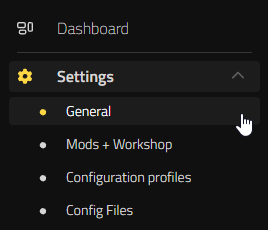
- Locate the Base Settings section and toggle on the Enable Server Transfer option.

Rules and Restrictions
Before initiating a move, you need to understand the limitations set by Funcom.
- Storage Limits: The transfer system only stores one character per player account at a time. You must import an exported character before you can export a new one.
- Cooldown Timers: After a successful import, a cooldown activates. Official PvP servers require a 7-day wait before your next transfer. Unofficial servers, PvE, and PvE-C servers impose a 24-hour cooldown.
- Server Type Compatibility: Characters on Official PvP servers can move anywhere. PvE-C characters can move to other PvE-C or PvE servers. PvE characters are restricted to other PvE servers. Single-player and co-op characters cannot transfer to dedicated servers.
- Clan Status: You cannot transfer while belonging to a Clan. You must leave your current Clan first.
- Weight Limits: Characters cannot be over-encumbered during the export process.
Pre-Transfer Checklist
A successful jump to a new server means packing the right gear and dropping what you cannot keep.
- You keep your equipped items, hotbar, and main inventory.
- You keep your followers up to the server limit. Their levels, stats, and inventories transfer with them. Once you arrive, you will need to build a new landclaim to place them from your Follower UI.
- You lose all buildings and placeables tied to the character.
- We strongly recommend removing all modded items and thralls before initiating a transfer. Support teams cannot restore characters lost due to incompatible mods.
How to Export Your Character
When your inventory is sorted and your Clan ties are severed, you are ready to pack up.
- Log into Conan Exiles with the character you want to move.
- Press ESC on your keyboard or Options on your controller to open the main menu.
- Navigate to Character > Server Transfer.
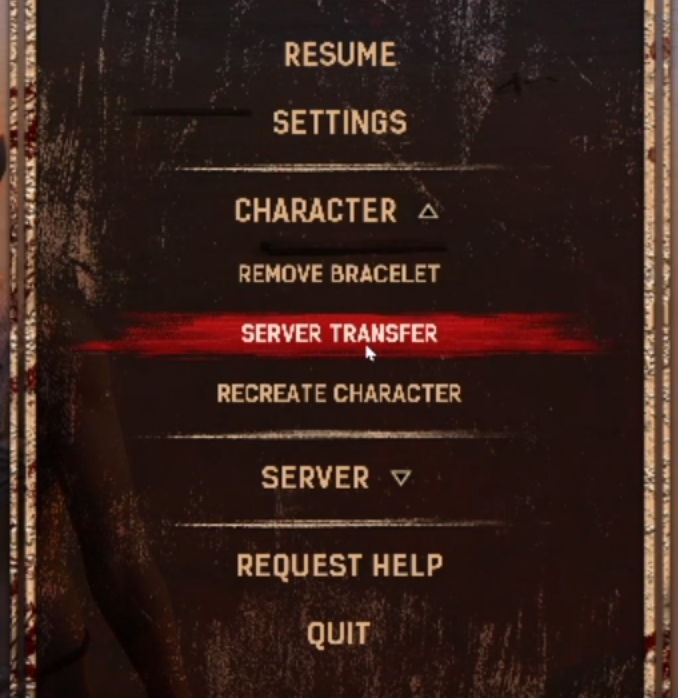
- Review the data summary in the Export Character menu. Ignore any visual errors in the displayed stats, as this is a known issue.
- Proceed to the confirmation dialogue to review your eligible destination server types.
- Confirm the transfer. You will receive a success message and the game will disconnect you to the Main Menu.
Pro Tip: If you change your mind after exporting, you can delete the stored character under the Account tab in your Settings menu. This frees up the slot but permanently deletes the character.
How to Import Your Character
Your character is now safely stored in the cloud. It is time to claim a new patch of desert.
- Open the Server Browser menu.
- Select your new server and join.
- On the character creation screen, click the Import Character button. If the server rejects the transfer, a “Cannot Import Character” button appears with an explanation.
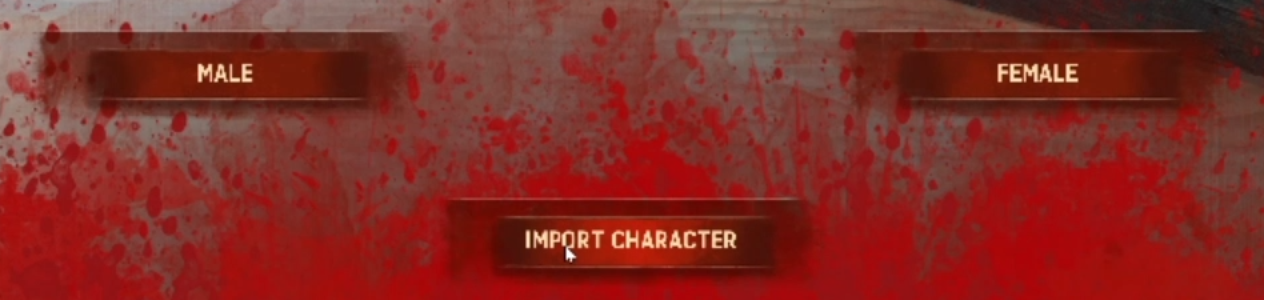
- Review the character data summary and click through the confirmation prompts.
- Spawn into the map and begin building your new base.
Transferring Between Enhanced And Legacy Versions
The Conan Exiles universe now spans two different engine versions. You must check whether your destination server runs Conan Exiles Enhanced (Unreal Engine 5) or Conan Exiles Legacy (Unreal Engine 4).
Moving from a Legacy server to an Enhanced server requires specific file management to ensure your character data migrates safely. You might also decide to keep your community on the Legacy version to maintain compatibility with older mods.
To learn exactly how to manage this engine transition and secure your server files, read our complete guide on how to prepare your server for the Conan Exiles UE5 update.
Exiled In All The Lands
Mastering the transfer system gives you total freedom over where you play. You can join your friends on a fresh server, escape a dominated PvP map, or simply explore a new modded environment without losing hundreds of hours of progress. Take your favorite weapons, rally your strongest thralls, and carve out a new destiny in the Exiled Lands today.


