Guides

DayZ FAQs: Offline Mode, Release Date & Xbox Guide
Rent your own prepaid DayZ server for PC, PS4 or Xbox today at Nitrado.net
Frequently Asked Questions
Chernarus doesn’t wait for anyone to catch up, and neither do the questions new DayZ players ask us most. Below, you’ll find the game’s release history and current platform lineup, whether offline play is possible on Xbox or PC, core survival skills like rope and fire crafting, and how to manage a DayZ server through Nitrado.
How to Play DayZ Offline on Xbox One
DayZ does not have an offline or single-player mode on Xbox One, and that has not changed with Update 1.29 or any patch since. If you are looking for a way to play DayZ without connecting to a live multiplayer server, Xbox is not the platform that offers it, official or otherwise.
This is a hard platform restriction, not a bug or an oversight. Sony and Microsoft both block third-party mods and Steam Workshop installs on console, the same restriction that keeps DayZ console servers from running mods (covered later in this guide). Since every offline workaround that exists for DayZ runs through a mod or a Workshop tool, none of them can reach an Xbox console. There is no hidden menu option, no developer console command, and no settings toggle that turns on offline play on Xbox. If a video or article claims otherwise, treat it as inaccurate.
Can You Play DayZ Offline on PC?
PC is a different story. While DayZ still has no official single-player campaign, PC players have two ways to play without joining a live multiplayer server.
The first is self-hosting. Bohemia Interactive makes the official DayZ server files available as a free download for PC, and you can run one on your own machine or local network as a private, controlled environment instead of joining a public server.
The second is the DayZ Community Offline Mode, an unofficial tool built by the community and distributed through the Steam Workshop. It is not made or supported by Bohemia Interactive, but it is widely used by PC players who want a single-player-style experience.
Neither option works on console. Both rely on the same server files and Workshop infrastructure that Sony and Microsoft block on Xbox and PlayStation, so the offline routes available to PC players stay off the table for console owners.
When Did DayZ Come Out? (DayZ Release Date and Update History)
DayZ began as a mod, not a standalone game. Dean Hall released the DayZ Mod for Arma 2 on January 21, 2012, turning Bohemia Interactive’s military sim into a zombie survival sandbox almost overnight.
DayZ Standalone followed years later. It entered Steam Early Access on December 16, 2013, then spent five years in development before its full 1.0 release on December 13, 2018. Console players joined afterward: Xbox One launched March 27, 2019, and PlayStation 4 followed on May 29, 2019.
The game has kept expanding since. Frostline, a paid expansion adding the Sakhal map, released October 15, 2024. Update 1.29 landed April 8, 2026, and brought a native Xbox Series X|S version as a free upgrade for existing Xbox owners, PC Game Pass availability through Xbox Play Anywhere, and limited crossplay between Xbox consoles and the Xbox or Microsoft Store PC build. Steam PC and PlayStation still run on separate server pools with no crossplay between them.
Looking ahead, Bohemia has targeted the Badlands expansion, which adds the Nasdara Province map, for October 2026. It is expected to bring a native PlayStation 5 version, though as of this writing that release has not shipped, so treat both as planned rather than confirmed.
How to Play DayZ: A Quick-Start Guide
Every DayZ run starts the same way: you spawn on the coast with almost nothing, usually a flashlight, a rag, and the clothes on your back. From there, the game becomes a loop of managing your character’s needs while gathering enough gear to survive longer.
Hunger, thirst, and body temperature are the first threats, long before other players or the infected. Check your status screen regularly and prioritize finding food and a water source, such as a well, a pond, or purification tablets, within your first few in-game hours. Cold, wet clothing drains your temperature fast, so looted clothing and a heat source matter as much as a weapon.
Looting comes next. Head for small towns and industrial buildings first: they carry food, tools, and basic weapons with less risk than military bases, which draw more infected and more armed players. Move quietly, stay off open ground, and treat every town as if someone else is already in it.
Early on, avoid fights you do not need. Infected are dangerous in groups and will alert nearby players to your position if you let them chase you. Other survivors are the bigger threat: many will not hesitate to kill you for your gear. Until you are geared up, your best strategy is to stay unseen, gather what you need, and move on.
The sections below cover specific mechanics, including item rotation, rope crafting, and fire-starting, in more depth.
How to Rotate Items in DayZ
Rotating items in DayZ takes one keyboard command. Open your inventory, click and hold the item you want to turn, then press the Spacebar to rotate it in place.
Rotation only works on items that take up more than one inventory slot, since a single-slot item has nothing to reorient. It is also a keyboard-and-mouse action: there is no controller-native input for it, so console players need a keyboard connected to their Xbox or PlayStation to rotate items at all.
How to Make Rope in DayZ
DayZ gives you two ways to craft rope, and both start with a knife.
The first method uses rags. Cut rags from any cloth item with a knife, then gather two stacks of 6 rags each. Combine the two stacks together to create 1 rope.
The second method skips the rags entirely. Harvest large guts, either from a survivor’s body or a large animal, then combine them directly with a knife to create rope on the spot.
How to Make a Fire in DayZ
Starting a fire in DayZ comes down to combining the right materials into a fireplace kit, then igniting it.
First, build the kit. Combine kindling, which can be rags, light or dark bark, paper, or a bandage, with a single short stick or a piece of firewood. This creates a fireplace kit you can place on the ground.
Once it’s placed, add more short sticks or firewood if you want the fire to burn longer before it needs more fuel. Then ignite it with a match, a lighter, a road flare, or a hand-drill kit. If you don’t have any of those on hand, you can craft a hand-drill kit from a single short stick and a piece of bark, so a lack of matches doesn’t have to end your fire.
Can I Become an Administrator on My DayZ Console Server?
- At the moment there is no option to become an administrator in the console versions of the game.
- To handle the Banlist and Whitelist, this is done through your Nitrado Web Interface.
Why Does My DayZ Server Have Performance Issues?
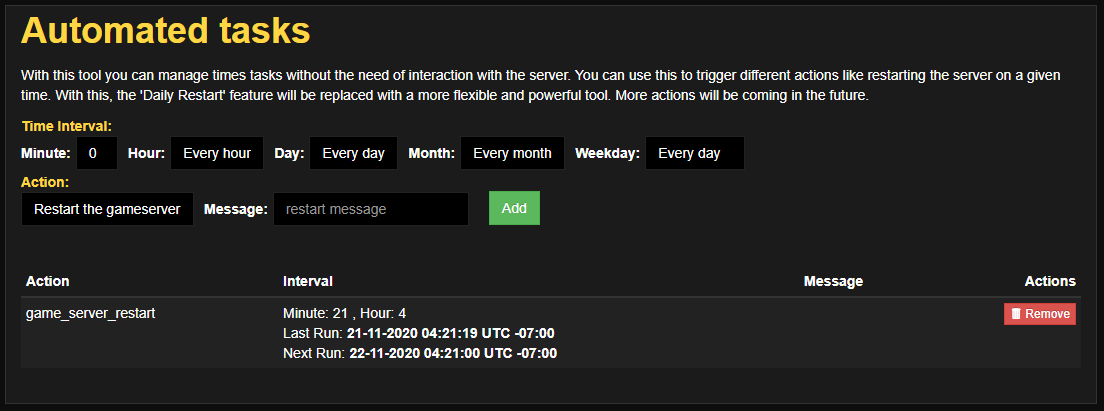
Make sure you have automatic reboots set up on your server. Based on Nitrado’s own hosting experience, we recommend rebooting the server 4 to 6 times a day to help avoid performance problems. You can configure automatic reboots of your server from the Web Interface in the Tools menu, or from the messages.xml file. See Messages for DayZ (Xbox) for the full setup. This applies to both console and PC servers.
How Can I Install Mods to My DayZ Server?
It is possible to start your DayZ server with Mods Only on (PC). We explain how this works in this article: Install modifications in DayZ
Unfortunately, it is not possible to install Mods (Modifications) on DayZ Console servers.
There are restrictions in place by Sony and Microsoft which make it impossible. Console mod support remains blocked by this platform policy, with no indication that it will change.
General
What Is DayZ Standalone?
What has become known as simply DayZ, this game is the continuation of creator Dean Hall’s vision for his popular Arma 2 add-on now referred to as the DayZ Mod.
What Is the Difference Between the DayZ Mod and DayZ Standalone?
DayZ Standalone, as its name implies, is a wholly separate game built on its own foundations that are no longer reliant on the ArmA II bones which made the DayZ Mod possible. It is being developed alongside the creation of a new in-house game engine at Bohemia referred to as Enfusion. It also includes an extensively reworked Chernarus map.
Is DayZ Worth Buying?
DayZ is in the best and most stable state it has been in since launch, at least on PC. Steady updates keep expanding the game: Frostline added a new map in 2024, and Update 1.29 brought a native Xbox Series X|S version and limited crossplay in 2026. The rough edges that defined its early years are far less common now.
Console performance is still generally less consistent than PC, so if a perfectly smooth experience matters more to you than the setting, weigh that before buying on Xbox or PlayStation. On the whole, though, DayZ remains one of the few games that delivers large-scale, permadeath, multiplayer zombie survival at this scale, and it does it better today than it ever has.
What Platforms Can You Play DayZ On?
DayZ is available on Windows PC through Steam or through PC Game Pass via Xbox Play Anywhere, on Xbox One and Xbox Series X|S (the Series X|S version is native, and a free upgrade for existing Xbox owners), on PlayStation 4 and PlayStation 5, and on Nintendo Switch 2. PS5 currently runs the game through PS4 backward compatibility; a native PS5 version is planned alongside the Badlands expansion.
Crossplay is limited: Xbox consoles and the Xbox or Microsoft Store PC build share a server pool, so players on those platforms can play together. Steam PC and PlayStation remain on separate server pools with no crossplay support.
What Are the System Requirements for DayZ Standalone? (PC)
The necessary hardware and software for the Windows PC version of DayZ are listed below, as found on the Steam Store page.
| MINIMUM | RECOMMENDED | |
|---|---|---|
| OS: | Windows 7/8.1 64-bit | Windows 10 64-bit |
| Processor: | Intel Core i5-4430 | Intel Core i5-6600K or AMD R5 1600X |
| Memory: | 8 GB RAM | 12 GB RAM |
| Graphics: | NVIDIA GeForce GTX 760 or AMD R9 270X | NVIDIA GeForce GTX 1060 or AMD RX 580 |
| DirectX: | Version 11 | Version 11 |
| Hard Drive: | 16 GB available space | 25 GB available space |
| Sound Card: | DirectX®-compatible | DirectX®-compatible |
Frequently Asked Questions
How to Play DayZ Offline on Xbox One
Can You Play DayZ Offline on PC?
When Did DayZ Come Out? (DayZ Release Date and Update History)
How to Play DayZ: A Quick-Start Guide
How to Rotate Items in DayZ
How to Make Rope in DayZ
How to Make a Fire in DayZ
Can I Become an Administrator on My DayZ Console Server?
Why Does My DayZ Server Have Performance Issues?
How Can I Install Mods to My DayZ Server?
General
- What Is DayZ Standalone?
- What Is the Difference Between the DayZ Mod and DayZ Standalone?
- Is DayZ Worth Buying?
- What Platforms Can You Play DayZ On?
- What Are the System Requirements for DayZ Standalone? (PC)


