Guías
Subir un mundo existente a tu servidor de Valheim
¿Ya construiste una base impresionante o encontraste una semilla que no quieres dejar atrás? No tienes que empezar tu aventura en Valheim desde cero solo porque te mudas a un servidor. Sube tu mundo existente a tu servidor de Valheim y sigue jugando con tus amigos, manteniendo intactos tu progreso y tu mundo. En esta guía de Nitrado, te mostraremos cómo encontrar tus archivos de guardado locales, mover tu mundo de Valheim a tu servidor y asegurarte de que cargue correctamente.
Encontrar los archivos locales de tu mundo
Después de la actualización 1.0 Deep North y el lanzamiento completo de Valheim, la estructura de guardado ha cambiado un poco. Te guiaremos paso a paso para que encuentres los archivos de tu mundo.
La carpeta del mundo
El guardado de un mundo de Valheim ahora se encuentra dentro de su propia carpeta, que lleva el mismo nombre del mundo. Por ejemplo, si tu mundo se llama Quackheim, todo lo que necesitas está dentro de una carpeta llamada Quackheim. Esa carpeta contiene todos los archivos que tu mundo necesita, incluyendo los archivos que terminan en .chunk, .chunks, .db2, .fwl2 y .ok.
Mover tu mundo a local
Si tu mundo está guardado en Steam Cloud en lugar de tu PC, muévelo primero a local. De lo contrario, la carpeta de tu mundo no contendrá los archivos necesarios para subirlo al servidor.
- Abre Valheim y selecciona Start Game (Iniciar partida).
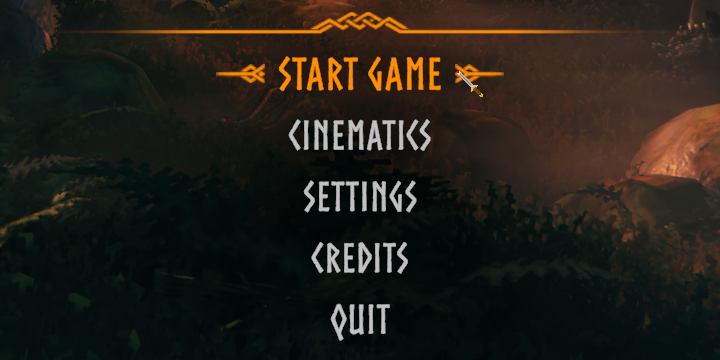
- En la parte inferior izquierda, selecciona Manage Saves (Gestionar guardados).

- Abre la pestaña Worlds (Mundos).
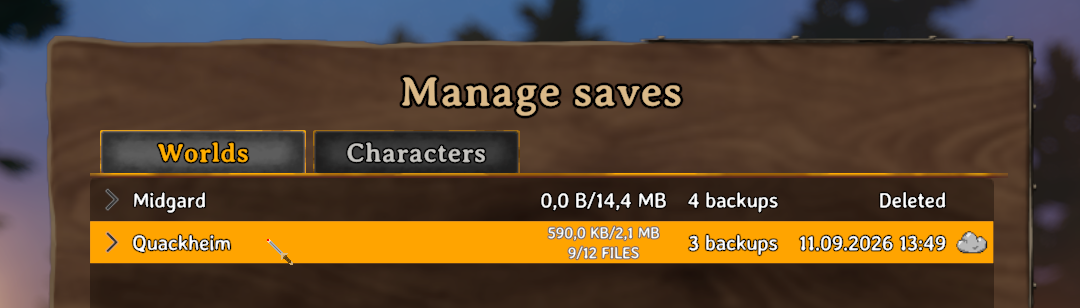
- Selecciona el mundo que quieres subir al servidor y elige Move to local (Mover a local).
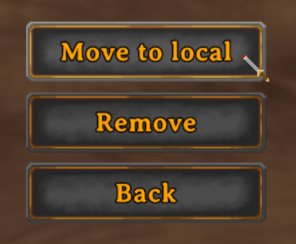
Este paso es el que llena la carpeta del mundo con todos los archivos que necesitas subir. Si lo omites, a la carpeta le faltarán partes importantes.
Encontrar tus archivos locales
En PC a través de Steam, los mundos locales se encuentran en:
C:\Users\<username>\AppData\LocalLow\IronGate\Valheim\worlds_local
Cada mundo se guarda en su propia carpeta dentro de esa ruta. Los jugadores de consola Xbox no pueden exportar sus guardados como archivos, ya que las consolas no pueden alojar servidores. Sin embargo, jugar al mismo guardado en una PC funciona a través de la versión del juego de la Microsoft Store, la cual guarda los archivos del servidor en:
C:\XboxGames\Valheim\Content\Server.
Subir tu mundo
Ahora que tienes los archivos locales de tu mundo, podemos subirlos a tu servidor de Nitrado. Tienes dos opciones para mover tus archivos, y te mostraremos ambas para que elijas el método que prefieras: un programa FTP externo o nuestro Explorador de Archivos interno.
Subir vía FTP
Un cliente FTP como FileZilla puede copiar toda la carpeta de tu mundo de un solo arrastre:
- Abre la interfaz web de tu servidor y detenlo.
- Conéctate al FTP de tu servidor de Nitrado utilizando las Credenciales FTP que están en tu Panel de Control.
- Arrastra la carpeta completa de tu mundo al directorio valheim > savedata > worlds_local del servidor.
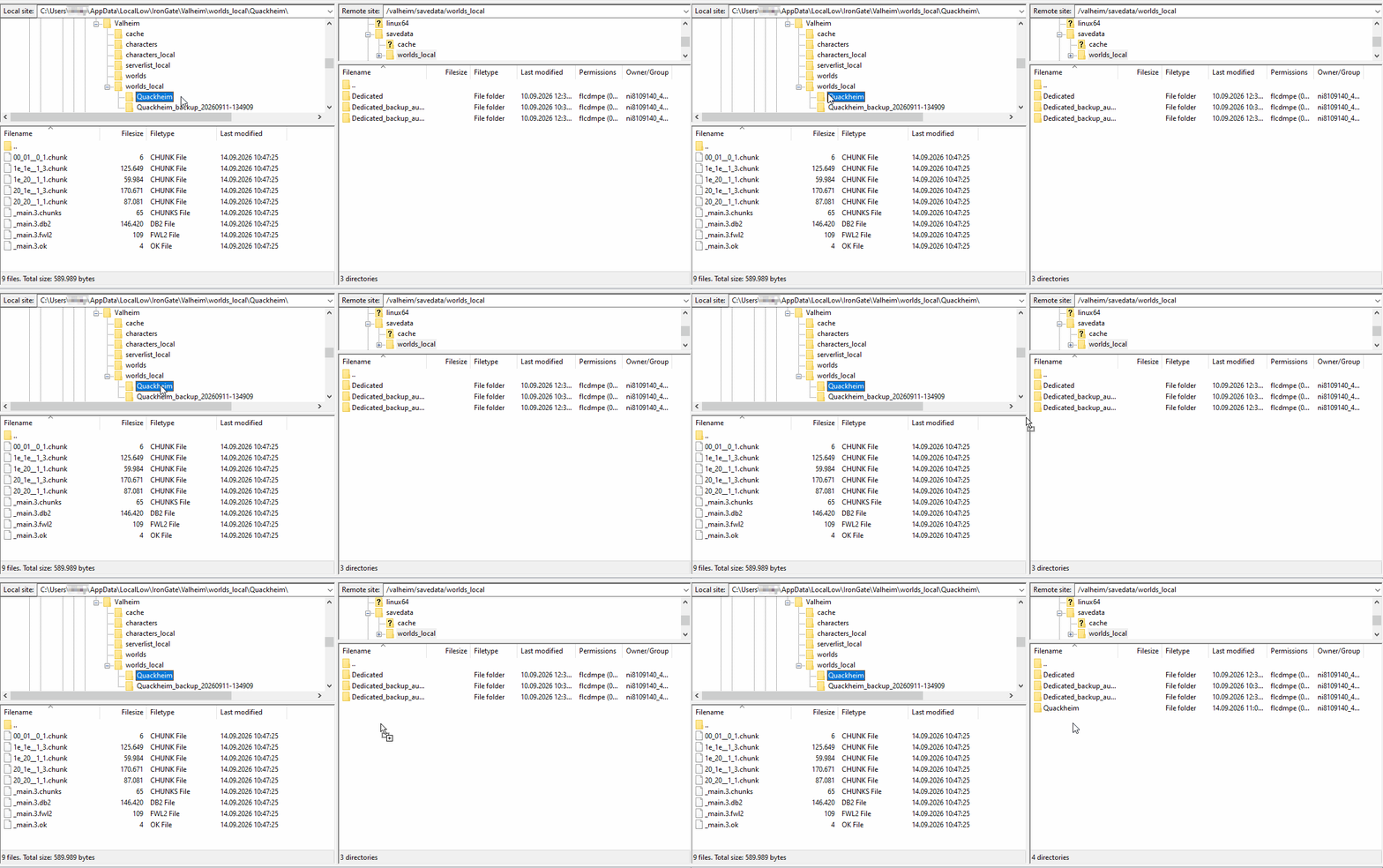
- Reinicia tu servidor y únete al mundo que acabas de subir.
Subir vía Explorador de Archivos
El Explorador de Archivos de tu interfaz web de Nitrado solo acepta archivos individuales, no carpetas completas. No obstante, aún puedes subir tu mundo creando un nuevo directorio para él y subiendo los archivos del mundo dentro de esa carpeta.
- Abre la interfaz web de tu servidor y detenlo.
- Navega a Herramientas > Explorador de Archivos (File Browser).
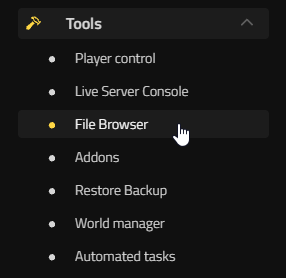
- Ve al directorio valheim/savedata/worlds_local/.

- Haz clic en New directory (Nuevo directorio), dale exactamente el mismo nombre que tu mundo y abre la carpeta que acabas de crear.

- Haz clic en Upload file (Subir archivo) y sube únicamente los archivos que están dentro de la carpeta local de tu mundo a la carpeta del servidor.

- Reinicia tu servidor y únete a tu mundo.
Hacer coincidir el nombre del mundo
Para asegurarte de que tu mundo se cargue correctamente, el campo World name (Nombre del mundo) debe coincidir exactamente con el nombre de la carpeta de tu mundo. Esto se aplica ya sea que hayas subido el mundo vía FTP o mediante el Explorador de Archivos.
- Navega a Ajustes > General en tu interfaz web.
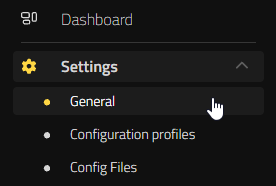
- Configura el campo World name para que coincida exactamente con el nombre de la carpeta de tu mundo.

- Selecciona Guardar cambios en la parte inferior derecha.
- Reinicia el servidor para que cargue tu mundo.
Tu servidor ahora debería cargar tu mundo existente en lugar de generar uno nuevo.
Preguntas Frecuentes
¿Necesito mover mi mundo a local si ya se guarda ahí?
No. Mover a Local solo es importante para los mundos que todavía están alojados en Steam Cloud. Si tu mundo ya se guarda en tu PC, su carpeta ya tiene todos los archivos que necesita.
¿Qué pasa si el nombre de mi carpeta no coincide con el de mi mundo?
El servidor tomará la discrepancia como un nuevo mundo y generará uno usando el nombre que esté configurado en Ajustes > General, en lugar de cargar el mundo que subiste.
¿Puedo subir solo los archivos individuales en lugar de toda la carpeta?
Sí, a través de nuestro Explorador de Archivos. Sube cada archivo desde el interior de la carpeta local de tu mundo directamente a la carpeta worlds_local de tu servidor.
¿Mi mundo actual seguirá funcionando con el contenido de Deep North?
Sí. Los mundos existentes se transfieren sin problemas, y la generación de nuevos biomas solo se aplicará a las áreas que aún no hayas explorado.
Tu saga continúa
Con la carpeta de tu mundo subida y el nombre emparejado correctamente, tu servidor de Valheim está listo para retomar justo donde lo dejaste. Tus construcciones, descubrimientos y progreso están todos en su lugar, así que puedes volver al mundo que has estado moldeando sin tener que empezar de nuevo. Reúne a tus amigos, cruza las puertas y vuelve a explorar, construir y sobrevivir, sea donde sea que te haya llevado tu viaje.
Encontrar los archivos locales de tu mundo
- La carpeta del mundo
- Mover tu mundo a local
- Encontrar tus archivos locales
Subir tu mundo
- Subir vía FTP
- Subir vía Explorador de Archivos
- Hacer coincidir el nombre del mundo
Preguntas Frecuentes
- ¿Necesito mover mi mundo a local si ya se guarda ahí?
- ¿Qué pasa si el nombre de mi carpeta no coincide con el de mi mundo?
- ¿Puedo subir solo los archivos individuales en lugar de toda la carpeta?
- ¿Mi mundo actual seguirá funcionando con el contenido de Deep North?
Tu saga continúa


