Guides

Dune: Awakening Character Transfer Guide
Ready to seek out new alliances or conquer fresh sands? When it is time to join friends or find a more active environment, Dune: Awakening allows you to complete a character transfer to a new server. By doing this, you keep your hard-earned progress, inventory, and blueprints instead of starting over. In this Nitrado guide, we will walk you through the preparation, restrictions, and exact steps to successfully transfer your character in Dune: Awakening.
How to Prepare for Character Transfer
Transferring is a major action that cannot be easily undone. To ensure you do not lose your base or vehicles, you must prepare your character BEFORE initiating the transfer.
- Back Up Your Base: To save your base layout for deployment on the new server, use the Base Reconstruction Tool (BRT). You can store up to three bases. If you do not complete this step, your structures will be left behind and lost.
- Back Up Vehicles: To bring your transport along, use the Vehicle Backup Tool (VBT) to save your vehicles. If a vehicle is too large for the tool, disassemble it with a Welding Torch and store the parts directly in your inventory.
- Secure Your Inventory: Your Solari balance, personal inventory, equipped gear, and bank contents will transfer with you. To prevent losing valuable assets, ensure all important items are on your person or in your bank.
- Check the Marketplace: To avoid leaving pending sales behind, cancel any active sales and retrieve the items. Items left on the marketplace will not transfer.
- Location: To initiate a transfer, your character must be located in Hagga Basin. You cannot leave from the Deep Desert or a Social Hub (Harko Village and Arrakeen).
- Stuck Outside Hagga Basin? If you cannot access your old server because it was deleted or the password was changed, you will be unable to log back in to travel to Hagga Basin. To solve this, Nitrado servers offer open, non-password-protected “Transfer Servers” in each World. You can use these as a gateway to log in and travel to Hagga Basin in preparation for your transfer.
Migrating Your World First
If you are a Nitrado server owner planning to move your entire community to a new World, the order of operations is critical. Do NOT transfer your character yet.
If you transfer your character before starting a server migration, you risk arriving in a new World that has no space left for your server. Follow these exact steps to ensure your community stays together:
- Check World Capacity: To find a suitable home for your server, open your Nitrado Web Interface and navigate to Tools > World Manager. Identify a World that has available capacity.
- Perform In-Game Backups: To secure everyone’s assets, log in and ensure all players have backed up their bases and vehicles using the tools mentioned in the previous section.
- Start the Migration: In the World Manager, move your server to the new World using the “Migration” move method. This grants a period during which your old and new server exist simultaneously.
- Move Your Character: Once the server is successfully established in the new World, log in to the game and transfer your character to follow it.
💡 Pro Tip: Always start the server migration first, then transfer the characters. With the release of major updates, Worlds fill up quickly. By securing your server’s spot first, you prevent the nightmare scenario of your character being stranded in a World where your server cannot follow.
How to Transfer Your Character
- Launch Dune: Awakening on your platform.
- Switch to the
Charactersmenu at the top.
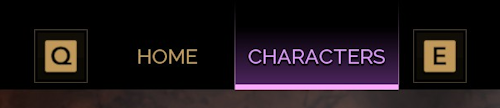
- Find and select your character from the list.
- Click the
Change Serverbutton on the left.
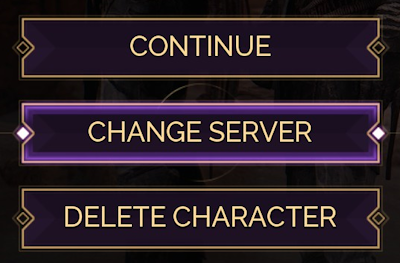
- Select
Privateat the top, then enter yourWorld Assignmentin the search bar.

Double-check theRegionat the bottom is set correctly. - Once found, click it. Look through the list and select your
Server Name(world).

- At the bottom right, click
Transferand enter “transfer” when prompted to confirm.
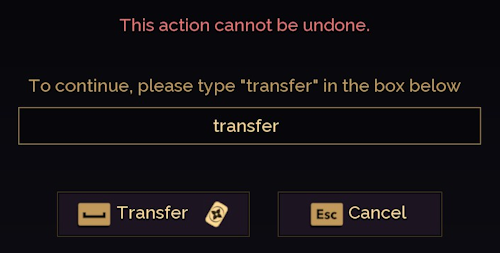
- Afterwards, enter your character name and click the
Confirmbutton. - If successful, then you will see a “Character Transferred” message.
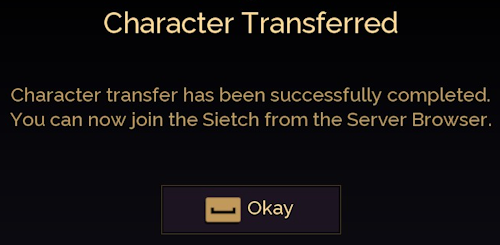
You can now join the new server with your existing character!
Transfer Rules & The Nitrado Advantage
To maintain fair play, Dune: Awakening restricts movement between certain server types. Standard transfers consume a Transfer Token, which carries a 7-day cooldown. However, Nitrado users benefit from a specific advantage regarding these tokens.
To help unite players and servers into active, populated environments, currently only specific Nitrado Worlds are available for new server orders or server moves. To further ease your migration process and help build stronger communities, we have completely removed the transfer token costs for these open worlds.
- Transferring to Open Nitrado Worlds: Does NOT consume a token. Regardless of your origin server, moving your character to one of our designated, open Nitrado Worlds is entirely free of the 7-day cooldown. This ensures you can join vibrant, growing communities without waiting.
Not all moves are allowed. To maintain game balance, Dune: Awakening enforces strict rules on where you can move, especially regarding Private, self-hosted, and Official servers.
| From | To | Allowed? |
|---|---|---|
| Official Server | Official Server | ✅ Yes |
| Official Server | Private Server | ✅ Yes (If enabled by host) |
| Official Server | Self-Hosted Server | ✅ Yes |
| Private Server | Official Server | ❌ NO |
| Private Server | Private Server | ✅ Yes (If enabled by host) |
| Private Server | Self-Hosted Server | ✅ Yes (If enabled by host) |
| Self-Hosted Server | Official Server | ❌ NO |
| Self-Hosted Server | Private Server | ❌ NO |
| Self-Hosted Server | Self-Hosted Server | ✅ Yes |
Private server owners can restrict transfers. If your transfer fails, it may be because the destination server does not accept incoming transfers, or because your current server does not allow transfers out. Single-player characters cannot transfer to or from any multiplayer server at all.
Character transfers are currently platform-locked. Dune: Awakening currently does not support crossplay, so a character cannot move between a PC server and a console server, and that applies to Nitrado servers as well. Funcom confirmed a crossplay update is planned for a future release, but whether cross-platform character transfers will be part of it is unclear but possible.
Forge Your New Path on Arrakis
Character transfers unlock a world of new possibilities, giving you the power to reshape your experience in Dune: Awakening. Whether you are moving to a new server to join a different faction, or you are simply looking to find a community that better suits your playstyle, the power to transfer your character ensures you can continue your adventure without losing progress. This flexibility lets you explore new alliances, participate in different events, or even lead your own private experience. No matter where you land, Arrakis will always be yours to conquer, so embrace the freedom to chart your course and shape the future of your story. 🏜️
Frequently Asked Questions
What happens if my name is taken on the new server?
If your character name is already in use by another player on the destination server, the game will prompt you to choose a new name before you can complete the transfer.
How often can I transfer?
Your transfer frequency depends on your destination. To help unite players into active communities, currently only specific Nitrado Worlds are open for new orders and server moves. To make migrating easier, we have configured these open worlds to not consume Transfer Tokens, meaning you can move to them as often as you like without a penalty. For all other moves, the process consumes a Transfer Token. These tokens are limited to one per account and have a 7-day cooldown period before regenerating.
Can I transfer if I already have a character on the destination server?
No. You cannot have two characters on the same server. You must delete the existing character on the destination server before transferring your main character there.
Why did my transfer fail?
Common reasons include:
- Your character is not in Hagga Basin.
- The destination server is full or offline.
- You are on a Private Server trying to move to an Official Server.
- Your Transfer Token is still on cooldown.
Does Dune: Awakening Support Crossplay Transfers Between PC and Console?
No. Dune: Awakening does not support crossplay, so a character transfer only works between servers on the same platform: a PC character can move to another PC server, and a console character can move to another console server, but the two platforms cannot cross. Funcom has confirmed a crossplay update is planned for a future release, though it remains unclear whether cross-platform character transfers will be included.
How to Prepare for Character Transfer
Migrating Your World First
How to Transfer Your Character
- Transfer Rules & The Nitrado Advantage
Forge Your New Path on Arrakis
Frequently Asked Questions
- What happens if my name is taken on the new server?
- How often can I transfer?
- Can I transfer if I already have a character on the destination server?
- Why did my transfer fail?
- Does Dune: Awakening Support Crossplay Transfers Between PC and Console?


