Notícias
Hytale Update 5 – What Are The Major Changes?
The journey through Orbis is about to become significantly improved with the Hytale Update 5! Whether you’re a creator building masterpieces, excited for a friends list, or wanting to explore various servers in the discovery, there are a lot of changes with this update. In this Nitrado article, we’ll break down the most important ones. If you haven’t already, update your Hytale launcher to start playing Update 5 👏
Rent Your Own Hytale Server
⚠️ Important Notification: Nitrado Hytale servers with mods installed will remain on the old update to prevent mod incompatibility issues. This gives you time to update mods so nothing major breaks when switching to the latest version. When you’re ready, you may select the new release version from your web interface.
Hytale Community Server Discovery
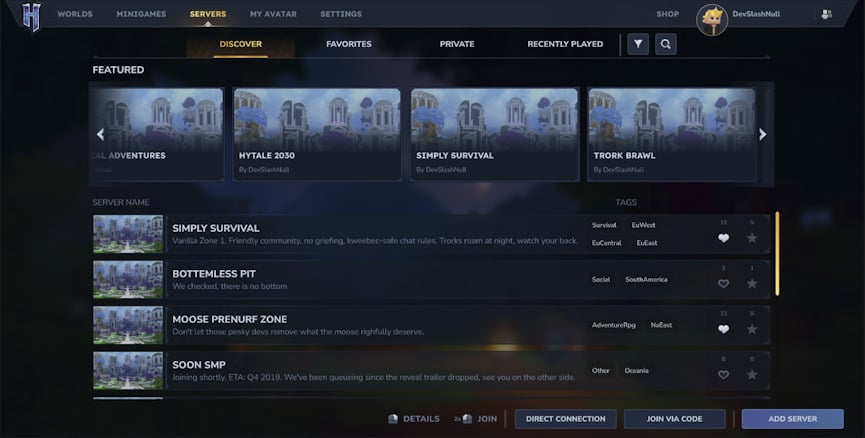
By far the most anticipated feature is the server discovery in Hytale. This allows you to showcase your server in-game for players to quickly search & join. You must first get approved by the Hytale Team, which you can learn more about here. Rather than exploring third-party listing sites, you can easily find servers in Hytale from this discovery list.
Controller Support Added
You can now play Hytale while relaxing on the couch! With the newly added controller support, you can use a gamepad to start your adventures. The development team wants the game to be more accessible by everyone. This is the first iteration of controller support, so as updates continue we may see more quality-of-life improvements like this one!
Shape Your Story with Trigger Volumes
One of the most impactful features of this update is the Trigger Volume Tool. This gives you the ability to build scripted encounters and events, without writing a single line of code. By placing down 3D volumes, you can set up specific effects to happen when a player enters, exits, or lingers within a designated area.
How to Use Trigger Volumes:
- Navigate to Creative Tools > Trigger Volume Tool: This dedicated UI allows you to place, resize, and rotate volumes with real-time visual gizmos.
- Select Your Effects: Choose from over 15 built-in effects, including NPC spawning, weather changes, teleportation, and sound triggers.
- Set the Logic: You can add delays to effects or multi-select volumes to group them for complex, sequenced interactions.
With this fantastic tool, you can design adventure maps with ease or enhance your Hytale server with various detailed encounters. The possibilities are truly endless, especially when combined with other features.
Enhanced Building & Placement
Creative Mode has received a massive overhaul to its Quick Settings, making large builds faster and more intuitive. The new “Place Modes” allow for surgical precision when modifying your world. This improves the quality of your builds, as now everything is perfectly laid out.
| Feature | Description |
|---|---|
| Replace Mode | Swaps the block you are looking at with the one currently held. |
| Type Replace | Changes the material of a block (e.g., Stone to Wood) while keeping its specific shape. |
| Extrude & Draw | Click and drag to fill lines or draw freely on any surface plane. |
| Eraser & Fast Place | Speed up your workflow by breaking or placing blocks with rapid-fire efficiency. |
Social Sidebar & Discord Friends
Another massive feature from Hytale Update 5 is the Social Sidebar, a menu where you can add friends. This brings the community closer together, especially since you can join their worlds directly. You’ll be able to see who’s online, manage friend requests, and block players. There’s also Discord integration, meaning if you connected your Discord account to Hytale – you can add your friends from there!
Audio Improvements
Hytale has implemented Audio Occlusion. This system uses raycasting to determine if materials are between a sound source and the listener. This effectively means that sounds can become realistically muffled when you’re behind walls or even ‘bends’ around doorways. It creates a much more immersive atmosphere, especially inside buildings.
Besides that, over an hour of new music has been added across Zones 1, 2, and 3! These include ambient fragments and full-length exploration tracks that change based on the time of day. This way your adventures always have the perfect backing track.
Hytale Update 6
While many of the features for the next update remain unknown, as of right now – Simon has noted that controller support is one major feature. We strongly recommend watching closely at any official news or posts for upcoming changes. What we do know is that the Hytale Team is hard at work making the game better for everyone!

