指南

DayZ Loot Settings: Quantity, Tiers & Respawn Time
DayZ Loot Settings Server Introduction
Inside your DayZ server hosting, you’ll find yourself in a world of horror, with zombies around every corner. Gathering resources and surviving can feel near impossible when loot is scarce, which discourages new players who don’t realize a fix is sitting right in your server files. As a DayZ server owner, you control DayZ loot settings directly through the types.xml file, and adjusting them changes how forgiving or brutal your server feels for everyone who joins.
Loot settings in DayZ let you customize the loot possibilities for every item and piece of gear on your server: how many of an item spawns, which loot tier it belongs to, and how often it respawns after being picked up. Below, we’ll show you where the types.xml file is, walk through every option inside it, and cover exactly how DayZ loot tiers and loot respawn timing work so you can build a server that fits your players.
Where to Start: Finding the Types.xml File
To start, you’ll need to find your DayZ types.xml file before you can edit any loot setting. Follow these steps to find it and open it for editing:
- To begin, head to your DayZ Nitrado Web Interface.
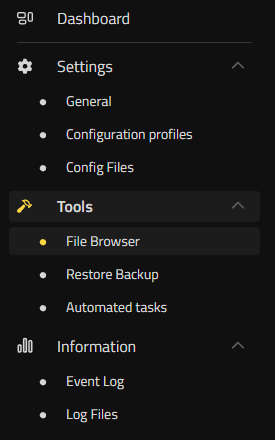
- Then, on the left-hand side under “Tools“, click “File Browser“.
- Inside your DayZ file browser, go to the location dayzstandalone ➜ mpmissions ➜ dayzOffline.chernarusplus ➜ db ➜ types.xml.
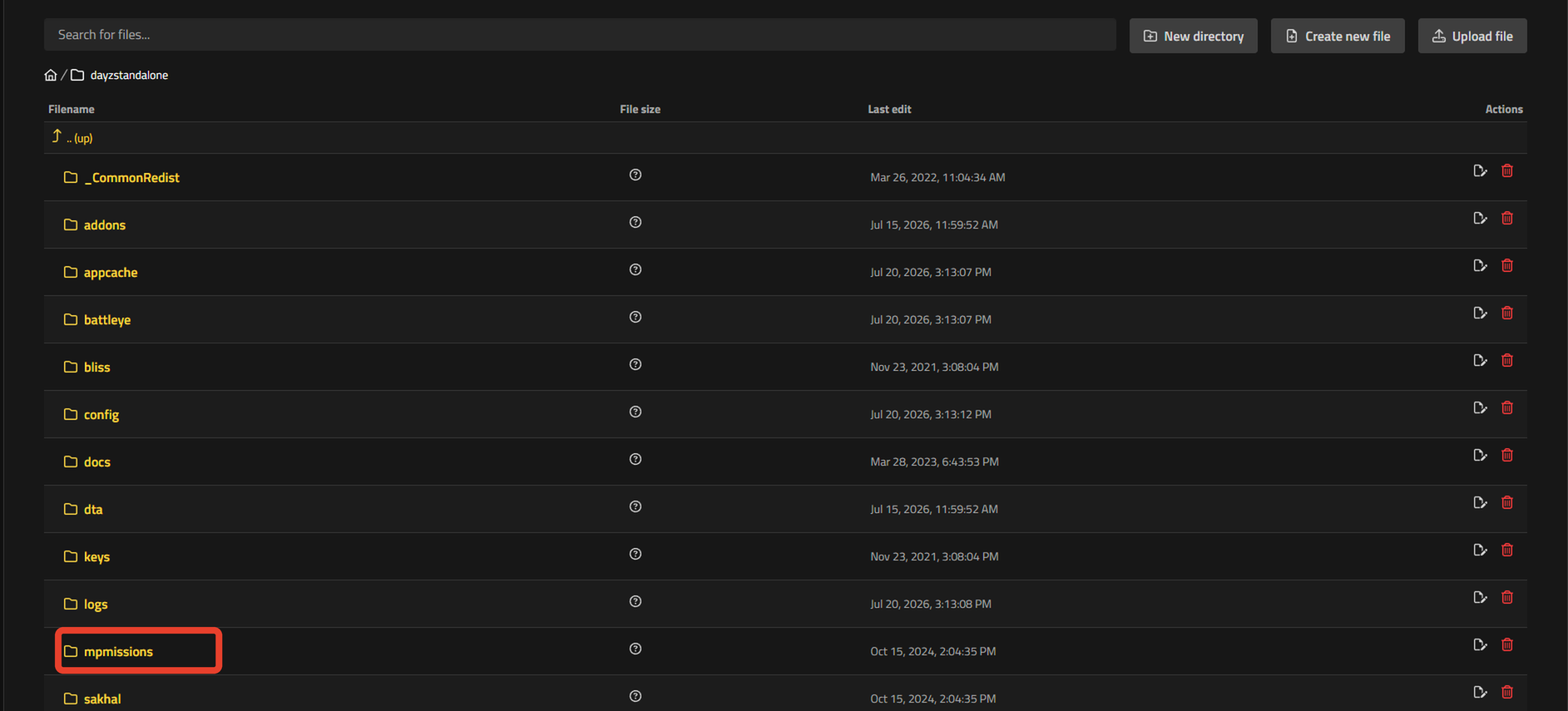
- You can now click to edit your “types.xml” file to start editing your server loot.
If your server runs a different map, the folder name changes: Livonia uses dayzOffline.enoch and Sakhal uses dayzOffline.sakhal in place of dayzOffline.chernarusplus.
DayZ Loot Settings Explained (Types.xml Options)
After opening the types.xml file, you’ll find thousands of lines covering every item and piece of gear in the game. To be precise, the file runs to more than 20,000 lines of options.
Inside this file, we recommend using the keyboard shortcut “CTRL” + “F” to bring up a search and quickly find the item you’re looking to edit.
You can now start adjusting each option for that particular item. Below, you’ll learn what each option does and how it affects loot on your server.
| Option | Description |
|---|---|
| nominal | Sets the target number of that item the Central Economy tries to keep active on your map at once. Raise this value to increase how much of an item spawns overall. |
| min | Sets the floor that triggers a respawn. When the live count of an item drops to or below min, the Central Economy starts spawning more of it back toward nominal. |
| restock | Controls the pace of that respawn. A restock value of 0 means the item respawns in bulk on the server’s next economy cycle. A positive value is the number of seconds the server waits before spawning one single additional item, repeating until nominal is reached. |
| lifetime | Sets how long, in seconds, an item stays on the ground once it spawns before it despawns if nobody picks it up. |
| quantmin | Sets the minimum fill percentage a consumable spawns with, such as ammo boxes or water bottles. A value of -1 means quantity doesn’t apply to that item at all, which is normal for gear with no fill level, like weapons or tools. |
| quantmax | Sets the maximum fill percentage a consumable can spawn with. As with quantmin, a value of -1 means quantity doesn’t apply to that item. |
| cost | Sets a spawn-priority weight (default 100) used only to break ties when several qualifying items compete for the same loot slot. To control how often an item spawns, adjust nominal, min, and restock instead. |
| category name | Sets a category for the item that affects where and how it spawns. Options include Weapons, Tools, Containers, Clothes, and more. |
| usage name | Sets the zone group an item can spawn in, such as Farm, Industrial, Medic, Hunting, Military, and more. |
| value name | Sets the loot tier of an item, Tier1 through Tier4, which controls how far from the coast or how deep into military territory it can spawn. |
Once you’ve finished adjusting the options for your DayZ items, press “Save changes” and restart your DayZ server to apply them.
How to Increase Loot Spawn in DayZ Server (Nominal and Min)
Here’s how to increase loot spawn in your DayZ server: nominal and min are the two fields to change first. Raising nominal directly increases the target number of that item circulating on the map. Change an AK74’s nominal from 10 to 20, and the Central Economy tries to keep twice as many in the world. Raise min alongside it, using roughly 50 to 70 percent of the new nominal value, so the item starts respawning again as soon as the count drops instead of waiting until the map nearly runs dry. A nominal of 20 with a min of 12, for example, keeps a steady flow of that item without flooding every building at once. Push restock down to 0 on top of that, and picked-up loot returns in bulk on the next economy cycle rather than waiting on a timer.
DayZ Loot Tiers Explained (Value Tier1-Tier4)
The value field in types.xml assigns an item to a loot tier, named Tier1 through Tier4. Tier1 covers the low-value, coastal side of the map: common civilian gear like clothing, canned food, and basic tools. Tier4 sits at the opposite end, covering high-value zones deep inland and around military installations, where the best weapons, optics, and armor spawn. Tier2 and Tier3 fill the space between, spreading mid-value gear across inland towns and industrial areas.
Value works together with the usage field rather than replacing it. Usage sets the type of zone an item can appear in (Military, Medic, Farm, Industrial, and more), while value sets how far into the map that zone needs to be before the item shows up. An assault rifle, for example, typically carries a usage of Military alongside a value of Tier3 or Tier4, so it only spawns inside military-flagged buildings that also sit in those higher tiers. Add a lower tier value to that same item, and it starts appearing in military buildings closer to the coast too.
Where Each Loot Tier Spawns (DayZ Loot Map)
Every value tier maps to real zones on the ground, and where those zones sit changes by location rather than following one universal rule. On Chernarus, the tiers run from the eastern and southern coastline through inland towns and up into the military-heavy north, the same loot map broken down zone by zone in the DayZ Chernarus Map Guide: Every Zone by Gear Tier. Editing the value tags in types.xml changes what spawns where without moving any of those zone boundaries.
How Often Does Loot Respawn in DayZ?
Loot respawn in DayZ is controlled by the min and restock fields you set for each item, combined with one condition you don’t set in types.xml at all: players need to be far enough from the spawn point for the Central Economy to act. Once the live count of an item drops to or below its min value, the server marks it as due for a respawn. From there, restock decides the timing: a restock of 0 respawns the full batch back up to nominal on the game’s next economy cycle, while a positive restock value is the number of seconds the server waits before adding back a single item, repeating until nominal is reached again. Lifetime works alongside both settings rather than against them. It only controls how long an untouched item survives on the ground before despawning, so a short lifetime clears old items faster but has no effect on how quickly new ones spawn in.
For loot to actually respawn near a building or area, players generally need to be well clear of that spot for the full length of the restock timer. Leave a squad camped inside a military base, and the restock timer nearby keeps resetting no matter how low you set restock in types.xml.
How Long Does It Take for Loot to Respawn in DayZ?
There’s no single answer, because you control the exact timing through restock. Community server documentation puts real-world restock values roughly between 600 and 7,200 seconds, meaning loot can come back in as little as 10 minutes or take up to 2 hours depending on how each item is configured. Setting restock to 0 skips the timer entirely: the item respawns in bulk on the next economy cycle once min and the player-distance condition are both met. The real DayZ loot respawn time on your server is whatever restock value you type into types.xml for that specific item, so check that field before assuming every gun, medical supply, or food item respawns at the same pace.
Edit the Looting Possibilities on Your DayZ Server Today
After adjusting the loot settings, tiers, and respawn timing on your server, you and your friends will notice the difference the next time you log in. Whether you raised nominal and min for more weapons and gear, retuned loot tiers, or shortened restock so ammo comes back faster, every change traces back to the types.xml file you now know how to find and edit.
DayZ Loot Settings Server Introduction
- Where to Start: Finding the Types.xml File
DayZ Loot Settings Explained (Types.xml Options)
- How to Increase Loot Spawn in DayZ Server (Nominal and Min)
DayZ Loot Tiers Explained (Value Tier1-Tier4)
- Where Each Loot Tier Spawns (DayZ Loot Map)
How Often Does Loot Respawn in DayZ?
- How Long Does It Take for Loot to Respawn in DayZ?
Edit the Looting Possibilities on Your DayZ Server Today


