We use marketing and analytics cookies and similar technologies with your consent. Cookies may also be set by third-party providers, including those based in third countries such as the USA. The USA does not offer an equivalent level of data protection compared to the EU. Therefore, there are certain risks when transferring data to the USA in the context of the use of cookies, especially with regard to access by US authorities.
By clicking on Allow cookies, you confirm that we may set cookies for marketing and analysis purposes. Furthermore, vou agree that your personal data may be transferred to third countries such as the USA.
You can refuse the use of marketing and analytics cookies at any time and revoke your consent or make appropriate adjustments under the settings. You can find further information in our privacy policy.
Cookie settings
Marketing
Marketing cookies are used to track visitors across websites. The intention is to display ads that are relevant and engaging for the individual user and thereby more valuable for publishers and third party advertisers.
Used by Google DoubleClick to register and report the website user's actions after viewing or clicking one of the advertiser's ads with the purpose of measuring the efficacy of an ad and to present targeted ads to the user.
Used to measure the efficiency of the website’s advertisement efforts, by collecting data on the conversion rate of the website’s ads across multiple websites.
Sets a unique ID for the visitor, that allows third party advertisers to target the visitor with relevant advertisement. This pairing service is provided by third party advertisement hubs, which facilitates real-time bidding for advertisers.
Tracks if the user has shown interest in specific products or events across multiple websites and detects how the user navigates between sites. This is used for measurement of advertisement efforts and facilitates payment of referral-fees between websites.
This cookie is set and used in connection with the website's BotManager function. This feature detects, categorizes and generates reports on potential bots trying to access the website for the website operator.
This cookie is set by Twitter and it is used by Twitter services, to monitor referral links, and login status. This is a session cookie and it is erased when the user closes the browser. This cookie is managed by Twitter.
This cookie is set by Twitter and serves to identify the user with a unique number associated with Twitter. It is stored for 2 years. This cookie is managed by Twitter.
Tracks the conversion rate between the user and the advertisement banners on the website - This serves to optimise the relevance of the advertisements on the website.
Collects statistics on the visitor's visits to the website, such as the number of visits, average time spent on the website and what pages have been read.
This cookie contains an ID string on the current session. This contains non-personal information on what subpages the visitor enters – this information is used to optimize the visitor's experience.
This cookie is set by Twitter - The cookie allows the visitor to share content from the website onto their Twitter profile.
400 days
HTTP Cookie
Necessary
Necessary cookies help make a website usable by enabling basic functions like page navigation and access to secure areas of the website. The website cannot function properly without these cookies.
This cookie is used to distinguish between humans and bots. This is beneficial for the website, in order to make valid reports on the use of their website.
This cookie is necessary for making credit card transactions on the website. The service is provided by Stripe.com which allows online transactions without storing any credit card information.
This cookie is a part of the services provided by Cloudflare - Including load-balancing, deliverance of website content and serving DNS connection for website operators.
This cookie is necessary for making credit card transactions on the website. The service is provided by Stripe.com which allows online transactions without storing any credit card information.
1 day
HTTP Cookie
currency.code [x2]
nitrado server.nitrado.net
Cache the currency for the next visit
Persistent
HTML Local Storage
currency.symbol [x2]
nitrado server.nitrado.net
Cache the currency for the next visit
Persistent
HTML Local Storage
gameslugs.cache
nitrado
set the prefered currency
Persistent
HTML Local Storage
registered [x2]
nitrado server.nitrado.net
Supplies info for choosing the adequate sign in/up-form (login/registration)
Collects data on visitor behaviour from multiple websites, in order to present more relevant advertisement - This also allows the website to limit the number of times that they are shown the same advertisement.
This cookie is used to distinguish between humans and bots. This is beneficial for the website, in order to make valid reports on the use of their website.
1 day
HTTP Cookie
cookiebottest
server.nitrado.net
cookiebot test
Persistent
HTML Local Storage
dynamic-loca.de-DE.cache
server.nitrado.net
locakey update cache
Persistent
HTML Local Storage
dynamic-loca.en-GB.cache
server.nitrado.net
locakey update cache
Persistent
HTML Local Storage
dynamic-loca.en-US.cache
server.nitrado.net
locakey update cache
Persistent
HTML Local Storage
dynamic-loca.es-ES.cache
server.nitrado.net
locakey update cache
Persistent
HTML Local Storage
dynamic-loca.fr-FR.cache
server.nitrado.net
locakey update cache
Persistent
HTML Local Storage
dynamic-loca.it-IT.cache
server.nitrado.net
locakey update cache
Persistent
HTML Local Storage
dynamic-loca.ja-JP.cache
server.nitrado.net
locakey update cache
Persistent
HTML Local Storage
dynamic-loca.pl-PL.cache
server.nitrado.net
locakey update cache
Persistent
HTML Local Storage
dynamic-loca.pt-BR.cache
server.nitrado.net
locakey update cache
Persistent
HTML Local Storage
dynamic-loca.ru-RU.cache
server.nitrado.net
locakey update cache
Persistent
HTML Local Storage
dynamic-loca.zh-CN.cache
server.nitrado.net
locakey update cache
Persistent
HTML Local Storage
dynamic-loca.zh-TW.cache
server.nitrado.net
locakey update cache
Persistent
HTML Local Storage
features.cache
server.nitrado.net
feature flag cache
Persistent
HTML Local Storage
firstVisit
server.nitrado.net
used to identify if it is the first visit and set the language in the local storage
Persistent
HTML Local Storage
fp
server.nitrado.net
used for internal statistics to identify actions
Persistent
HTML Local Storage
games.cache
server.nitrado.net
game data cache
Persistent
HTML Local Storage
GAMESERVER
server.nitrado.net
Used for the CakePHP session.
30 days
HTTP Cookie
geoRegionCode.cache
server.nitrado.net
geo region cache
Persistent
HTML Local Storage
i18n_redirected
server.nitrado.net
Determines the preferred language of the visitor. Allows the website to set the preferred language upon the visitor's re-entry.
1 year
HTTP Cookie
locations.cache
server.nitrado.net
location cache
Persistent
HTML Local Storage
notifications.cache
server.nitrado.net
notification cache
Persistent
HTML Local Storage
originalLocation
server.nitrado.net
Preserves the visitor's session state across page requests.
Session
HTML Local Storage
payments
server.nitrado.net
cache the available paymethods
Persistent
HTML Local Storage
previousCookieConsent [x2]
server.nitrado.net oauth.nitrado.net
previous cookie consent setting
Persistent
HTML Local Storage
promocode_list.cache
server.nitrado.net
promocode list cache
Persistent
HTML Local Storage
site-wide-banner-notifications.cache
server.nitrado.net
internal notification cache
Persistent
HTML Local Storage
vuex
server.nitrado.net
Registers whether the user is logged in. This allows the website owner to make parts of the website inaccessible, based on the user's log-in status.
13 months
HTTP Cookie
Additional information
To make your visit user-friendly and to offer you information, functions, or advertising tailored to your interests, we use marketing and analysis cookies or similar technologies with your consent. Third-party cookies may also be set, including those based in the USA. Compared to the EU, the USA does not offer an equivalent level of data protection, in particular limited data subject rights. Therefore, there are certain risks associated with the transfer of personal data to the USA in the context of the use of cookies.
By clicking on "Allow cookies", you accept that we set cookies for marketing and analysis purposes. Furthermore, you hereby expressly accept that your personal data will be transferred to the USA and that you are aware of the associated risks. You can refuse the use of marketing and analytics cookies at any time and revoke your consent or make appropriate adjustments under the settings. For more information on the topic of cookies and data protection in the USA, please see our privacy policy.
Minecraft is full of mystery and adventure, where players enter randomly generated worlds full of unique mobs, blocks, and objects. During these adventures, Minecraft worlds often grow with more mobs appearing, fellow Minecraft players joining, chunks generating, and buildings being created. While a Minecraft adventure grows, the system running that adventure will need to grow alongside it. If the system running the game or Minecraft server world begins to run out of memory, issues such as lag and the game not saving properly can occur leading to frustration among all players.
To help avoid running out of memory, it’s possible to increase these resources by adding more RAM to your Minecraft game or server. Adding more RAM will boost your Minecraft game and server in a variety of ways. These boosts to gameplay include increasing how many players can join, how many mods can be supported, the number of worlds that can be played on, and much more! This ensures you can achieve more with your and your players’ Minecraft experience. Follow us into the depths of the Minecraft caves as we explore how to allocate more RAM in Minecraft for your game and Minecraft server!
HOW TO ALLOCATE MORE RAM IN MINECRAFT
UPGRADING YOUR MINECRAFT SERVER HOSTING WITH NITRADO
Head to your Minecraft server panel to begin upgrading your server with more RAM.
On the left side of the navigation near the bottom, press the “UP_/DOWNGRADE” option.
After selecting this option, you’ll be able to adjust all of the specifics of your server including the player slots, server location, hardware/RAM, and advanced pay for your server runtime.
Change these to best suit your server and then press “Continue”.
You’ll now be able to confirm the payment for that upgrade, adding more RAM to your server!
Important: If you reach the maximum amount of RAM within the ultimate pack and you need more, you can keep increasing the RAM assignment to your server if you increase the current slots.
ALLOCATING MORE RAM FOR YOUR MINECRAFT GAME
To increase the allocated RAM in Minecraft, your computer will need to have the RAM available. By default, Minecraft will use 2 GB of RAM on your PC. We recommend only increasing the RAM on your Minecraft game if your computer can handle it to avoid potential memory issues and crashes that can occur from running out of RAM. When you’re ready to allocate more RAM, follow these steps to enhance Minecraft:
Firstly, open the Minecraft Launcher and select “Minecraft: Java Edition”.
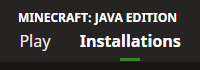
While viewing the top of the Java Edition navigation, press the “Installations” option.
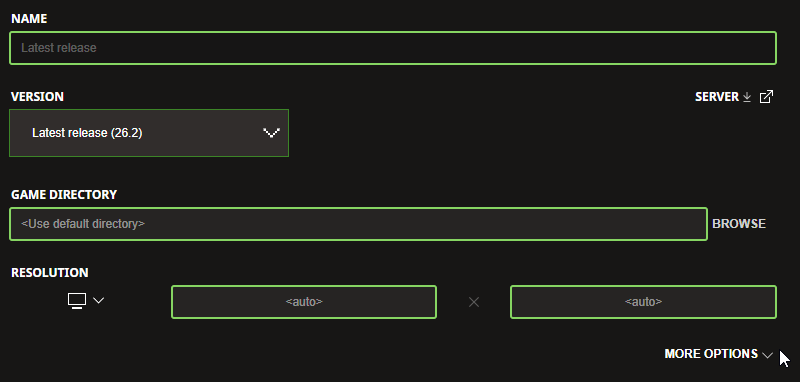
In this menu, find the version you’re currently using, hover over it, press the “…” option, and then press “Edit” to edit that version.
Afterward, click on the “More Options” dropdown in the edit menu. This will open the settings that increase the amount of allocated RAM for Minecraft.
The additional options you will see include “Java Executable” and “JVM Arguments”. The Java Executable option can be used to change the Java version that Minecraft uses. In this guide, we’ll focus on the JVM Arguments that allow us to increase the allocated RAM.
In the “JVM Arguments” section, the argument “-Xmx2G” determines how much RAM is allocated to your Minecraft game from your computer. “2G” in this argument means 2GB of RAM is currently allocated, which is the default for Java Edition.
Change “2G” to the amount of RAM you would like to allocate for Minecraft. In our example, we’re changing this setting to “3G” or 3GB of RAM.
After making that adjustment to your “JVM Arguments”, then press the “Save” option at the bottom right of the Minecraft Launcher.
You’ll then be back in the “Installations” section. Near the top of the Java Edition navigation, press “Play” to get ready to start playing.
Before starting Minecraft, check to make sure the correct version you just edited is selected for Java Edition.
Finally, when you’re ready press the “Play” button. Minecraft will now start that version with more allocated RAM!
ALLOCATING MEMORY FOR MODDED MINECRAFT LAUNCHERS
ADDING MORE RAM TO CURSEFORGE LAUNCHER
Open the CurseForge Launcher on your computer.
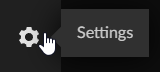
Near the bottom-left of the launcher, press the gear icon to access the settings.
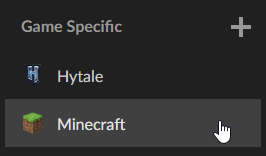
In the settings, select “Minecraft” under the “Game Specific” section.
On the Minecraft settings page, scroll through until you see “Allocated Memory”.
Adjust the allocated memory to the ideal amount for your game/modpacks.
After making that change, go back to your modpacks on the CurseForge Launcher. Start a modpack to experience the increased allocated memory!
INCREASING RAM ALLOCATED ON FTB LAUNCHER
Access the FTB Launcher for Minecraft.
Once opened, at the home section, click on the modpack you’d like to run.
After selecting that modpack, on the right click the “Settings” option for that modpack.
In that modpack’s settings, under “Instance Memory”, you can increase the allocated memory. Use the slider to change the memory.
Once set, back out to that modpack and start the modpack to begin your modded adventure with more memory!
ATLAUNCHER ALLOCATED MEMORY OPTIONS – HOW TO INCREASE
Start the ATLauncher on your computer.
On the right-side navigation of the launcher, press the “Settings” option.
In the settings, view the top bar navigation and select the “Java/Minecraft” option.
In the ATLauncher “Java/Minecraft” settings, locate the “Maximum Memory/Ram” setting.
Using the arrows next to that setting, adjust the allocated memory for the ATLauncher.
After making adjustments to the memory, click the “Save” button at the bottom.
Lastly, go to your “Packs” section on the ATLauncher and start your installed modpack to play with more allocated memory/RAM.
HOW MUCH RAM DO I NEED FOR A MINECRAFT SERVER?
Minecraft is an ever-evolving game with many unique creatures, features, and blocks. With so much to offer including multiplayer with friends, it is currently recommended to have at least 2GB of RAM on a Minecraft game server. When hosting through Nitrado, all Minecraft servers include 2GB of RAM and can be upgraded to have even more RAM allocated!
While your server grows, you will gain many more players along with the possible additions of plugins, mods, or more worlds. During this growth, the amount of RAM your Minecraft server needs may increase. Whenever you find that you’re reaching the limit of the RAM on your Minecraft server, the steps provided earlier will help guide you to upgrade your server in seconds for more RAM and more server potential!
UPGRADE YOUR MINECRAFT ADVENTURE WITH MORE RAM
Taking only a few seconds, allocating more RAM takes Minecraft to entirely new heights to support more players, mods, plugins, and worlds. Now that you know how to allocate more RAM to Minecraft, endless possibilities await you and your friends. Will you try growing the largest Minecraft network of all time? Or maybe install some unique mods for a modded Minecraft adventure? Allocate more RAM today and prepare for wondrous new adventures ahead for you and your friends on your Minecraft server!